
What happens when a customer is interested in your store but leaves before buying?
For many ecommerce businesses, that customer simply disappears.
But it does not have to work that way.
Most shoppers do not visit once and buy immediately. They browse, compare products, leave, return, add items to cart, hesitate, purchase, and sometimes come back again.
That entire process is the ecommerce customer journey.
This is where ecommerce customer journey automation can make a real difference.
Automation helps your store stay connected with customers at important moments. It can send welcome emails, browsing reminders, cart recovery messages, order updates, review requests, product recommendations, and win-back campaigns.
The goal is not to overwhelm customers with messages.
It is to make each step feel timely, useful, and connected.
In this guide, you will learn how to automate the customer journey from visitor to repeat customer, which automations work best at each stage, and how to build a simple system that supports both sales and long-term customer relationships.
Section 1: What Is Ecommerce Customer Journey
Before you automate the customer journey, you need to understand what the journey actually means.
Many beginners think ecommerce automation is only about sending emails. But customer journey automation is bigger than that. It is about guiding people through the full path from first visit to repeat purchase.
A visitor does not become a loyal customer in one step.
They move through stages.
They discover your store, show interest, compare products, subscribe, buy, receive the product, use it, review it, and hopefully return again.
Ecommerce customer journey automation helps your store support those stages without doing everything manually.
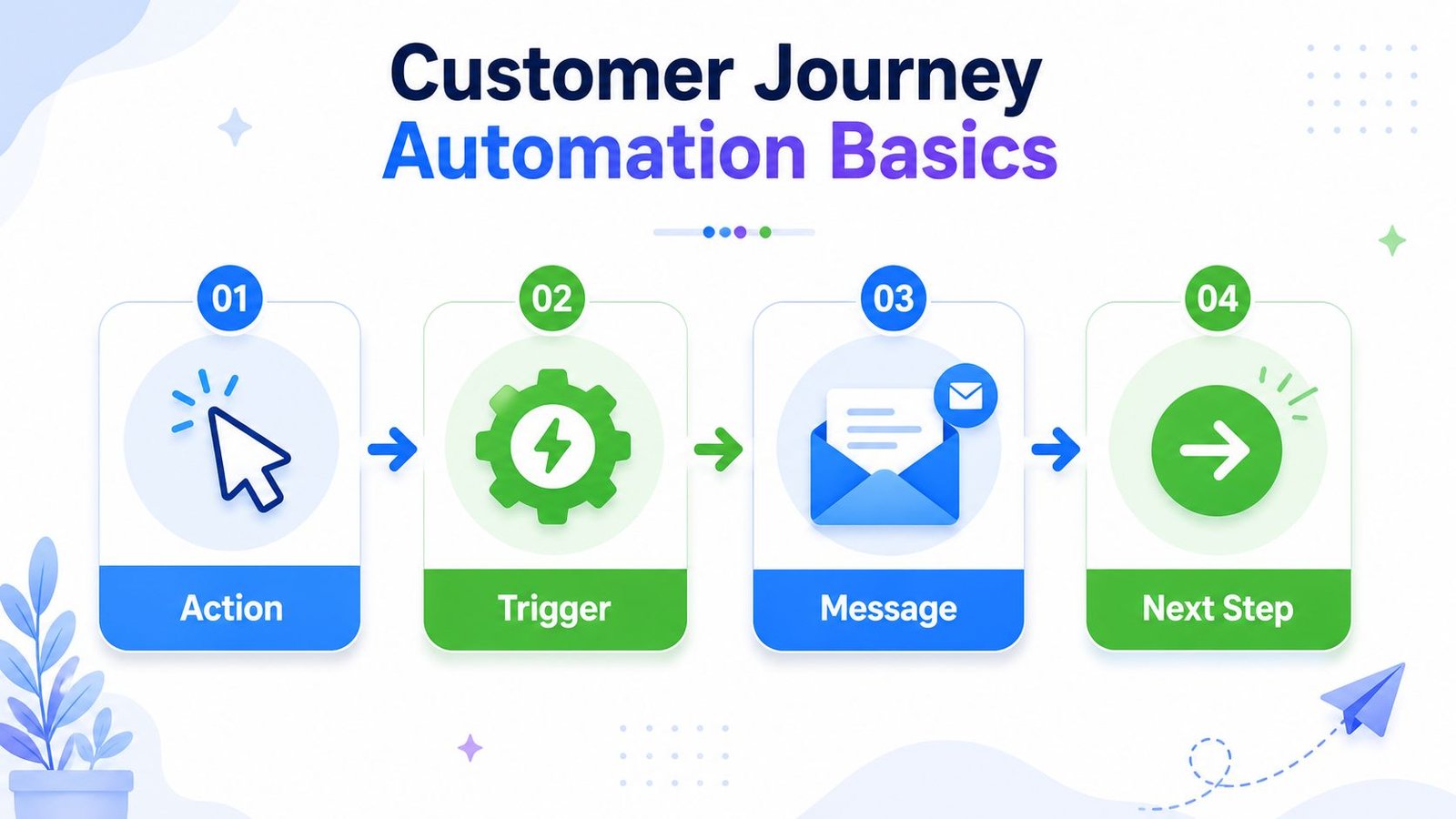
1.1 Simple Definition of Ecommerce Customer Journey Automation
Ecommerce customer journey automation means using automated workflows to guide customers through each stage of the buying journey.
In simple words, your store sends the right message or action based on what the customer does.
If someone joins your email list, they receive a welcome email. If someone leaves a product in the cart, they receive an abandoned cart reminder.
If someone buys, they receive an order confirmation, shipping update, or product usage tip.
The goal is not to send random emails.
The goal is to help customers move from one stage to the next in a natural way.
For beginners, this matters because you cannot manually follow every visitor, subscriber, shopper, and buyer. Automation creates a simple system that keeps the journey connected.
1.2 What Is the Ecommerce Customer Journey?
The ecommerce customer journey is the path a person takes with your store.
It usually starts when someone visits your website for the first time. At that point, they are only a visitor. They may not know your brand well yet.
If they sign up for your email list, they become a subscriber or lead.
If they browse products, compare options, read reviews, or add something to cart, they become an interested shopper.
When they complete the first purchase, they become a buyer.
After that, they become a customer who needs support, updates, and a good product experience. If they come back and buy again, they become a repeat customer. Over time, if they trust your brand and keep returning, they may become a loyal customer.
So the journey can look like this:
Visitor → Subscriber → Shopper → Buyer → Customer → Repeat Customer → Loyal Customer
Automation helps you communicate differently at each stage.
1.3 How Automation Supports the Journey
Automation supports the ecommerce customer journey by responding to customer behavior.
The customer takes an action, and your system sends the next helpful message.
For example,
A welcome email can support a new subscriber.
An abandoned cart reminder can support a shopper who almost bought.
A shipping update can support a buyer who is waiting for an order.
A review request can support the social proof stage after the customer has used the product.
A win-back email can reconnect with someone who has not purchased for a while.
Each message has a purpose.
It should not feel like noise. It should feel like the store is helping the customer at the right time.
That is what makes customer journey automation powerful.
1.4 Customer Journey Automation vs Random Marketing
Customer journey automation is not the same as random marketing.
Random marketing sends the same message to everyone, whether they are ready or not.
For example, sending the same discount email to new subscribers, recent buyers, loyal customers, and inactive customers may not work well.
Each group has a different need.
A new subscriber may need trust. A cart abandoner may need reassurance. A recent buyer may need order support. A loyal customer may need early access or a reward.
Customer journey automation is behavior-based and stage-based.
It looks at where the customer is in the journey and sends a message that fits that stage.
This makes the communication feel more relevant and less annoying.
1.5 Beginner Example
Let’s imagine a simple online clothing store.
A visitor lands on the website and browses shirts. Before leaving, they sign up for 10% off their first order.
The store automatically sends a welcome email with the discount code, a short brand introduction, and a link to best-selling shirts.
Later, the subscriber returns and adds a blue cotton shirt to the cart. But they leave before buying. A few hours later, the store sends an abandoned cart reminder with the product image, size guide, return policy, and a clear “Return to Cart” button.
The customer comes back and completes the order.
After purchase, the store sends an order confirmation and shipping update. After delivery, it sends care instructions for the cotton shirt. A few days later, it asks for a review.
Later, the store recommends matching trousers or another shirt color.
This is ecommerce customer journey automation in action.
The store is not sending random messages. It is guiding the customer step by step, from visitor to subscriber, from shopper to buyer, and from buyer to repeat customer.
Section 2: Why Ecommerce Customer Journey Automation Matters
Ecommerce customer journey automation matters because customers need guidance.
Most people do not move from first visit to final purchase in one perfect step. They may need reminders, trust, product education, order updates, support, and a reason to return.
If your store only communicates once, you may lose many good opportunities.
Automation helps your store stay connected through each stage of the journey without manually following every customer.

2.1 Customers Do Not Buy in a Straight Line
Customers rarely buy in a straight line.
A person may visit your store today, browse products tomorrow, sign up for a discount next week, and buy later when they feel ready. Another customer may add something to cart and leave because they need more time.
That does not always mean they are not interested.
It means they are still moving through the journey.
For example, someone may visit a beauty store and look at a moisturizer. They may read the product description, check reviews, compare prices, and leave. A few days later, they may return and buy.
This is why one visit is not always enough.
Many customers need multiple touchpoints before they feel confident enough to purchase.
2.2 It Helps Stores Communicate at the Right Time
Timing matters in ecommerce.
A welcome email works best after someone signs up. At that moment, they are interested and expecting to hear from your store.
An abandoned cart reminder works best after someone leaves a product in the cart. The product is still fresh in their mind, so the reminder feels relevant.
A review request works best after the customer receives and uses the product. If you ask too early, the customer may not be ready.
Ecommerce customer journey automation helps your store send messages based on timing and behavior.
The customer takes an action.
Your store responds with the right message.
That is much better than sending random emails and hoping they work.
2.3 It Reduces Missed Sales Opportunities
Many ecommerce sales are lost because there is no follow-up.
A visitor browses and leaves. A shopper abandons a cart. A buyer purchases once and never hears anything useful again. An old customer becomes inactive.
Without automation, these moments can disappear.
Customer journey automation helps reduce those missed opportunities.
A browse abandonment workflow can remind interested shoppers about products they viewed. An abandoned cart workflow can bring back customers who were close to buying. A win-back workflow can reconnect with inactive customers who already know the brand.
For example, a customer may add a cotton shirt to cart but leave before checkout. Without a reminder, the store may lose the sale. But if the store sends a helpful cart-recovery email with the product image, size guide, and return policy, the customer may return.
Automation gives your store a second chance.
2.4 It Improves Customer Experience
Customer journey automation is not only about sales.
It also improves customer experience.
Customers feel more supported when they receive useful updates, guidance, and answers at the right time. They do not want to feel confused after buying. They do not want to search everywhere for delivery details, product instructions, or support contact.
Automation can make the journey smoother.
For example, after a customer buys a digital product, the store can send the download link, access instructions, and a getting-started guide. After someone buys a skincare product, the store can send usage tips. After someone buys a shirt, the store can send care instructions.
These emails help customers feel cared for.
And when customers feel supported, they are more likely to trust the store.
2.5 It Supports Repeat Purchases
Repeat purchases are very important for ecommerce growth.
It is useful to attract new customers, but it is even better when existing customers come back again. They already know your brand, your product quality, and your buying process.
Automation can help bring them back.
Useful repeat purchase workflows include:
- post-purchase emails that support customers after buying
- product recommendation emails based on past purchases
- replenishment reminders for products customers may need again
- win-back emails for inactive customers
For example, if a customer buys a cleanser, the store can later recommend a moisturizer or sunscreen. If the cleanser usually lasts one month, the store can send a replenishment reminder around that time.
This feels helpful because it matches the customer’s real need.
2.6 It Saves Time for Store Owners
Customer journey automation also saves time for store owners.
Without automation, you may need to send welcome emails, cart reminders, order updates, review requests, product tips, and win-back messages manually.
That becomes difficult as the store grows.
Automation turns repeated communication into a system. You create the workflow once, set the trigger, write the message, and let the system send it when the customer reaches that stage.
This helps beginners stay consistent without doing everything by hand.
It also reduces mistakes.
You are less likely to forget follow-ups, miss review requests, or delay important customer communication.
That is why ecommerce customer journey automation matters. It helps your store communicate better, recover more opportunities, support customers, encourage repeat purchases, and save time.
When the journey feels connected, customers are more likely to keep moving forward.
Section 3: The Main Stages of the Ecommerce Customer Journey
Before you automate the customer journey, you need to understand the stages customers move through.
A customer does not go from stranger to loyal buyer instantly.
They usually move step by step. At each stage, they have different questions, doubts, needs, and expectations. This is why the same message will not work for everyone.
A first-time visitor needs guidance.
A subscriber needs trust.
A shopper needs reassurance.
A buyer needs support.
A repeat customer needs a reason to stay connected.
When you understand these stages, ecommerce customer journey automation becomes much easier to plan.

Stage 1: Visitor
A visitor is someone who lands on your website but has not subscribed or bought yet.
They may arrive from Google, social media, an ad, a blog post, a referral, or a product link. At this stage, they are still discovering your store.
They may not trust your brand yet.
They may not understand your products yet.
Your job at this stage is to make the website clear and helpful. The visitor should quickly understand what you sell, who it is for, and why your store is worth exploring.
Automation at this stage can include signup forms, welcome offers, product recommendations, or gentle chat prompts.
Stage 2: Subscriber or Lead
A subscriber or lead is someone who shares their email with your store.
This may happen because they want a discount, a free checklist, a product guide, a newsletter, or early access to offers.
This is an important step because the visitor has now given you permission to communicate with them.
But they are still not a customer yet.
They may be interested, but they may need more trust before buying. A welcome email workflow can help here. It can introduce your brand, deliver the promised offer, show best-selling products, and guide the subscriber toward the first purchase.
Stage 3: Interested Shopper
An interested shopper is someone who actively explores your products.
They may browse categories, view product pages, compare options, read reviews, check prices, or add products to cart.
This stage is important because the customer is showing buying intent.
But they may still hesitate.
They may wonder if the product is right, if the price is fair, if shipping is clear, or if the store is trustworthy. Automation at this stage can include browse abandonment emails, abandoned cart reminders, product education emails, reviews, and size guides.
The goal is to reduce hesitation and help the shopper move toward purchase.
Stage 4: First-Time Buyer
A first-time buyer is someone who completes their first purchase.
This is a major moment in the ecommerce customer journey. The person has moved from interest to action. They trusted your store enough to pay.
But the relationship is still new.
After purchase, they need reassurance. They want to know that their order was received, payment was successful, and the product will arrive or become accessible.
Automation at this stage can include order confirmation, payment confirmation, download links for digital products, and support contact details.
The first purchase should feel safe and smooth.
Stage 5: Supported Customer
A supported customer is someone who has bought and now needs help, updates, or guidance.
They may be waiting for delivery. They may need product usage tips. They may want care instructions. They may have questions about returns, setup, sizing, download access, or product use.
This stage is where many stores lose trust.
If the customer buys and hears nothing useful afterward, the experience may feel incomplete.
Post-purchase automation helps solve this. Shipping updates, delivery notifications, care guides, usage tips, and support links can make customers feel cared for after buying.
Support builds confidence.
And confidence helps future sales.
Stage 6: Reviewer or Advocate
A reviewer or advocate is a customer who shares feedback after using the product.
They may leave a review, write a testimonial, rate the product, post on social media, or recommend the brand to someone else.
This stage is powerful because customer feedback builds social proof.
Future shoppers often trust real customer experiences more than brand claims. If someone sees positive reviews, they may feel safer buying.
Automation can help by sending review request emails at the right time.
The key is timing.
Do not ask too early. Give the customer enough time to receive, use, and experience the product before asking for feedback.
Stage 7: Repeat Customer
A repeat customer is someone who comes back and buys again.
This is one of the most valuable stages in ecommerce.
A repeat customer already knows your brand. They have experienced your product and buying process. If the first experience was good, they may be easier to bring back than a completely new visitor.
Automation can support repeat purchases through product recommendations, replenishment reminders, cross-sell emails, upsell emails, and personalized offers.
For example, if a customer buys a cleanser, the store may later recommend a moisturizer or sunscreen.
The goal is to suggest something relevant, not random.
Stage 8: Loyal Customer
A loyal customer trusts your brand and may buy repeatedly over time.
They may prefer your store over others. They may open your emails, respond to offers, recommend your products, and return whenever they need something similar.
This is the stage every ecommerce store wants to reach.
Loyal customers should not be treated exactly like new customers. They may deserve early access, VIP offers, loyalty rewards, birthday emails, exclusive product updates, or personalized recommendations.
The full ecommerce customer journey can look like this:
- Visitor
- Subscriber or Lead
- Interested Shopper
- First-Time Buyer
- Supported Customer
- Reviewer or Advocate
- Repeat Customer
- Loyal Customer
Each stage needs a different type of communication.
That is why ecommerce customer journey automation is so useful. It helps your store send the right message based on where the customer is, instead of treating every customer the same way.
When each stage is supported properly, the journey feels smoother, more helpful, and more likely to lead to repeat sales.
Section 4: Visitor Stage Automation
The visitor stage is the first visible step in the ecommerce customer journey.
At this stage, the person has landed on your website, but they have not yet taken a strong action. They have not subscribed, added to cart, or bought anything.
They are only looking.
But that does not mean they are not valuable.
Every subscriber, shopper, buyer, repeat customer, and loyal customer starts as a visitor first. So the visitor stage is where your automation should begin carefully.
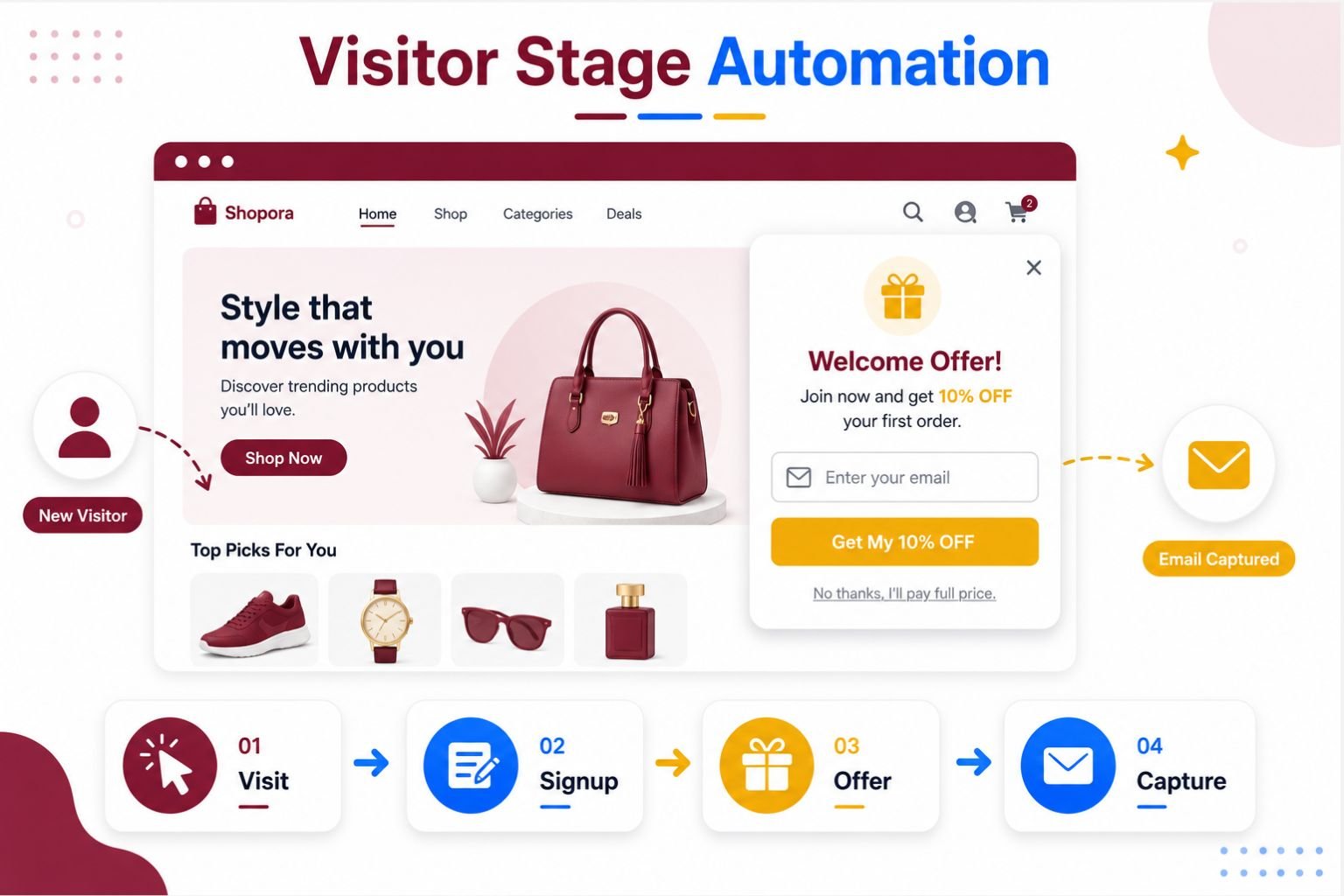
4.1 What Happens at the Visitor Stage?
A visitor is someone who comes to your ecommerce website and starts browsing.
They may be completely new to your brand. Or they may have visited before but are still exploring. They may land on your homepage, product page, category page, blog post, or landing page.
At this stage, the visitor is usually asking quiet questions.
What does this store sell?
Can I trust this brand?
Is this product right for me?
Is there a reason to stay here?
They may not be ready to buy yet. They may not even be ready to subscribe. But they are giving your store attention.
That attention is important.
If the website feels confusing, aggressive, or overwhelming, they may leave quickly. But if the store feels clear and helpful, they may take the next step.
4.2 Automation Goal at This Stage
The main goal at the visitor stage is to capture interest and guide the visitor toward the next step.
You are not trying to force a sale immediately.
You are trying to make the visitor stay longer, understand your offer, and feel comfortable enough to connect with your brand.
That next step may be joining your email list, viewing a product, reading a guide, starting a chat, or exploring a category.
For beginners, this is very important.
Many store owners focus only on getting traffic. But traffic alone does not build a business. If visitors leave and you have no way to reconnect, the opportunity disappears.
Visitor stage automation helps you keep that connection alive.
4.3 Useful Automations for Visitors
Visitor stage automation should be simple, light, and helpful.
You do not need to show too many messages. You only need to create a few smart touchpoints that guide the visitor naturally.
Useful automations for visitors include:
- email signup forms
- welcome offers
- exit-intent popups
- browse tracking
- product recommendations
- website chat prompts
An email signup form helps you turn an unknown visitor into a subscriber. A welcome offer can give them a reason to join your list, such as 10% off, a free checklist, a product guide, or early access.
An exit-intent popup can appear when someone is about to leave the website. If used carefully, it can capture interest before the visitor disappears.
Browse tracking can help your store understand which products or categories the visitor looked at. Later, if the visitor becomes a subscriber, this behavior can support browse abandonment emails or product recommendations.
Website chat prompts can also help. For example, if someone stays on a product page for a while, a small chat message can ask, “Need help choosing the right size?” or “Have a question about this product?”
The key is to make the automation feel useful, not distracting.
4.4 What to Avoid
The biggest mistake at the visitor stage is overwhelming people too early.
A new visitor should not feel attacked by popups, discount banners, chat boxes, countdown timers, and email forms all at once. That can make the store feel desperate or messy.
Too many messages can hurt trust.
For example, if someone lands on your website and immediately sees three popups before viewing the product, they may close the page.
Automation should support the visitor, not block them.
Avoid aggressive messages like “Buy now before it’s too late” when the person has only just arrived. At this stage, they may not even understand your product yet.
Also avoid offering discounts too quickly everywhere. If every visitor sees a discount instantly, it can train customers to wait for offers instead of valuing the product.
A better approach is calm and helpful.
Let visitors explore. Give them a simple signup option. Offer help when needed. Guide them toward the next step without pressure.
4.5 Example
Let’s imagine a beauty store.
A visitor lands on a skincare category page because they are looking for a moisturizer. They scroll through the products, read a few descriptions, and check some prices.
At this point, they are interested, but not ready to buy.
Instead of pushing them with a loud popup immediately, the store shows a simple signup form after they spend some time browsing.
The form says, “Get 10% off your first order.”
The visitor enters their email.
Now the store can continue the journey. The visitor receives a welcome email with the discount code, a short brand introduction, and links to best-selling skincare products.
Later, if they browse moisturizers again, the store can send more helpful product guidance or recommendations.
This is visitor stage automation working properly.
The store did not force the sale. It captured interest, created a connection, and guided the visitor toward the next step.
That is the purpose of automation at this stage.
When done well, visitor stage automation turns silent website traffic into real customer journey opportunities.
Section 5: Subscriber Stage Automation
The subscriber stage begins when a visitor gives you their email address.
This is a small action, but it is very important.
The person may not be ready to buy yet, but they have shown interest. They have allowed your store to continue the conversation outside the website.
That means the journey has moved forward.
At this stage, automation should not only send a discount code. It should build trust, introduce the brand, and guide the subscriber toward the first purchase.

5.1 What Happens at the Subscriber Stage?
At the subscriber stage, the visitor has shared their email but may not have bought anything yet.
They may have signed up for a discount, downloaded a free checklist, joined a newsletter, or requested early access to a product launch.
This person is no longer just a silent visitor.
Now your store has a way to reach them again.
But that does not mean they are fully convinced. A subscriber may still compare options, read more content, check reviews, or wait before buying.
So the goal is not to push immediately.
The goal is to help them understand why your store is worth trusting.
5.2 Automation Goal at This Stage
The main goal at the subscriber stage is to build trust and guide the subscriber toward the first purchase.
This is where many beginners make a mistake. They collect emails, send one discount code, and then stop.
But a subscriber often needs more than a code.
They need to know what your brand offers, which products are best for them, why your products are useful, and what makes your store different.
Automation can help with this through welcome emails and nurture emails.
A good subscriber-stage workflow makes the subscriber feel guided, not forgotten.
It helps them move from “I am interested” to “I am ready to buy.”
5.3 Welcome Email Workflow
The welcome email workflow is usually the first automation at this stage.
It starts after someone joins your email list.
The first email should welcome the subscriber and deliver anything you promised. If they signed up for 10% off, send the discount code clearly. If they signed up for a free checklist, send the download link immediately.
Then introduce your brand briefly.
Tell them what your store helps with, what kind of products you offer, and why customers choose you. Keep it short and human.
You can also link to best-selling products or popular product categories. This helps the subscriber know where to start.
For example, a fashion store can link to shirts, trousers, and new arrivals. A beauty store can link to cleansers, moisturizers, and sunscreens. A digital product store can link to beginner ebooks, templates, or checklists.
End the welcome email with one clear first-purchase CTA.
This could be “Shop Best Sellers,” “Use Your Discount,” “Explore the Guide,” or “Start Here.”
5.4 Nurture Email Workflow
A nurture email workflow educates subscribers before they buy.
Not every subscriber is ready to purchase from the first welcome email. Some need more information, proof, or confidence.
Nurture emails help by giving value before asking for the sale.
They can explain product benefits, answer common questions, share customer stories, or guide the subscriber toward the right product.
Useful nurture email ideas include:
- product guides
- buying tips
- brand story
- customer reviews
- comparison guides
- beginner-friendly recommendations
For example, a skincare store can send an email about how to choose the right moisturizer. A clothing store can send a guide on choosing the right shirt fit. A digital product store can send a blog post that helps beginners solve a real problem.
These emails still support sales.
But they do it through education and trust.
That is why nurture workflows are powerful. They help subscribers feel more prepared before buying.
5.5 What to Avoid
The biggest mistake at the subscriber stage is sending only a discount code and disappearing.
A discount may get attention, but it does not build a relationship by itself.
If your email says only “Here is your 10% off code,” the subscriber may use it once and forget your brand. Or they may not use it at all because they still do not know what to buy.
Another mistake is sending too many sales emails too quickly.
If every email says “Buy now,” the subscriber may feel pressured and unsubscribe.
A better approach is balance.
Welcome them. Deliver the promised offer. Introduce your brand. Educate them. Show useful products. Then guide them toward the first purchase.
The subscriber stage should feel like a helpful introduction, not a hard sales push.
5.6 Example
Let’s imagine a digital product store.
A visitor lands on the website and sees a free ecommerce checklist. The checklist helps beginners understand what to automate first in an online store.
The visitor enters their email to download it.
Immediately, the store sends a welcome email with the checklist link. The email thanks the subscriber, explains that the brand helps ecommerce beginners build simple growth systems, and gives them a clear place to start.
A day later, the store sends a helpful blog link about ecommerce automation basics. This email does not push a sale too hard. It helps the subscriber learn.
A few days later, the store recommends a beginner ebook on ecommerce automation.
This recommendation feels natural because the subscriber already downloaded a related checklist and read helpful content.
That is subscriber stage automation working well.
It does not rush the customer. It builds trust step by step and guides them toward a useful first purchase.
When done properly, subscriber stage automation turns email signups into real customer relationships.
Section 6: Consideration Stage Automation
The consideration stage is where interest becomes more serious.
At this point, the customer is no longer just visiting casually. They are looking at products, checking details, comparing options, reading reviews, and deciding whether they should buy.
But they have not fully decided yet.
This is a sensitive stage in the ecommerce customer journey. The customer may be close to buying, but small doubts can stop them. They may worry about size, quality, price, delivery, return policy, product fit, or whether the store is trustworthy.
Consideration stage automation helps reduce those doubts and guide the customer back when they leave.

6.1 What Happens at the Consideration Stage?
At the consideration stage, the customer is interested but still deciding.
They may view product pages several times. They may compare one product with another. They may read reviews, check pricing, look at product photos, open the size chart, or add something to cart.
These actions show buying intent.
But interest is not the same as purchase.
A customer may like a product but still need reassurance. They may want to think about it. They may get distracted. They may compare with another store. They may leave because checkout feels too soon.
This is why automation matters here.
If your store does not follow up, the customer may forget the product or buy somewhere else. But if your store sends the right reminder or helpful information, the customer may return with more confidence.
6.2 Browse Abandonment Workflow
A browse abandonment workflow follows up with people who viewed products but did not add anything to cart.
This usually happens when someone looks at a product page or category page and leaves without taking the next step.
For example, a customer may view a pair of shoes, read the description, check the color options, and leave. They did not add the product to cart, but their behavior still shows interest.
A browse abandonment email can remind them of what they viewed.
The message should feel helpful, not pushy. It can say something like, “Still thinking about this?” or “Here are the products you viewed.” It may also include similar products, customer reviews, or a link back to the category.
This workflow works best when the customer is already a subscriber or when tracking and consent settings allow follow-up.
The goal is simple: bring interested shoppers back before they forget.
6.3 Abandoned Cart Workflow
An abandoned cart workflow follows up with shoppers who added items to cart but did not complete the order.
This is a stronger signal than browsing.
When someone adds a product to cart, they are very close to buying. But they may leave because of shipping cost, payment issues, distraction, uncertainty, or hesitation.
An abandoned cart email helps bring them back.
A good cart reminder should show the product image, product name, cart link, and a clear CTA. It can also include trust signals such as return policy, secure checkout, delivery information, customer reviews, or support contact.
The message should remind the customer, not guilt them.
For example, instead of saying, “You forgot to buy,” a softer message like “Your cart is waiting” feels more natural.
This type of automation can recover sales that might otherwise disappear.
6.4 Product Education Emails
Sometimes customers do not buy because they need more information.
They may not understand the product fully. They may not know which option is right for them. They may wonder if the product solves their problem.
Product education emails can help answer those doubts.
These emails are useful because they build confidence before the sale. They show the customer how to choose, how to use, or why a product may be helpful.
Useful product education emails may include:
- size guides
- comparison guides
- product benefits
- customer reviews
- usage tips
- buying guides
- frequently asked questions
For example, a fashion store can send an email explaining how to choose the right shirt fit. A beauty store can send a guide on choosing moisturizer for different skin types. A digital product store can explain which ebook is best for beginners.
These emails do not need to be long.
They simply need to remove confusion.
When customers understand the product better, they feel more confident moving toward purchase.
6.5 What to Avoid
The biggest mistake at the consideration stage is pressuring customers too early.
Some stores use fake urgency, too many discount emails, or aggressive messages before the customer is ready. This can damage trust.
For example, if a customer views one product and immediately receives several emails saying “Last chance,” “Only today,” and “Buy now,” the experience may feel uncomfortable.
Urgency should be real.
Discounts should be used carefully.
The consideration stage should focus on reassurance, clarity, and helpful guidance. If you use pressure too much, customers may stop trusting your messages.
Another mistake is sending the same follow-up to every shopper.
Someone who only viewed a product may need education. Someone who added to the cart may need a reminder. Someone who left because of shipping concerns may need reassurance.
The more relevant the message feels, the better the automation works.
6.6 Example
Let’s imagine a fashion store.
A customer visits the website and views a blue cotton shirt. They check the product photos, read the description, and open the size chart.
This shows interest.
Later, they add the shirt to cart but leave before completing checkout.
A few hours later, the store sends a cart reminder email. The email includes the product image, product name, selected size, and a clear “Return to Cart” button.
It also includes a short line about the return policy and a link to the size guide.
This matters because the customer may have been unsure about fit. The email does not only say, “Buy now.” It gives reassurance.
The customer clicks the email, returns to the cart, checks the size guide again, and completes the order.
That is consideration stage automation working well.
It supports the customer at the moment of hesitation. It reminds them of what they liked, answers a possible doubt, and guides them back to the next step.
When done properly, consideration stage automation helps turn interested shoppers into first-time buyers without making the experience feel forced.
Section 6: Consideration Stage Automation
The first purchase stage is one of the most important moments in the ecommerce customer journey.
This is the point where a shopper stops thinking and finally takes action. They choose a product, complete checkout, and trust your store with their money.
That trust should be protected.
Many beginners think the journey pauses after payment. But for the customer, this is when a new concern begins. They may wonder if the order went through, when they will receive the product, how they can access it, and what to do if they need help.
First purchase stage automation helps remove that uncertainty.
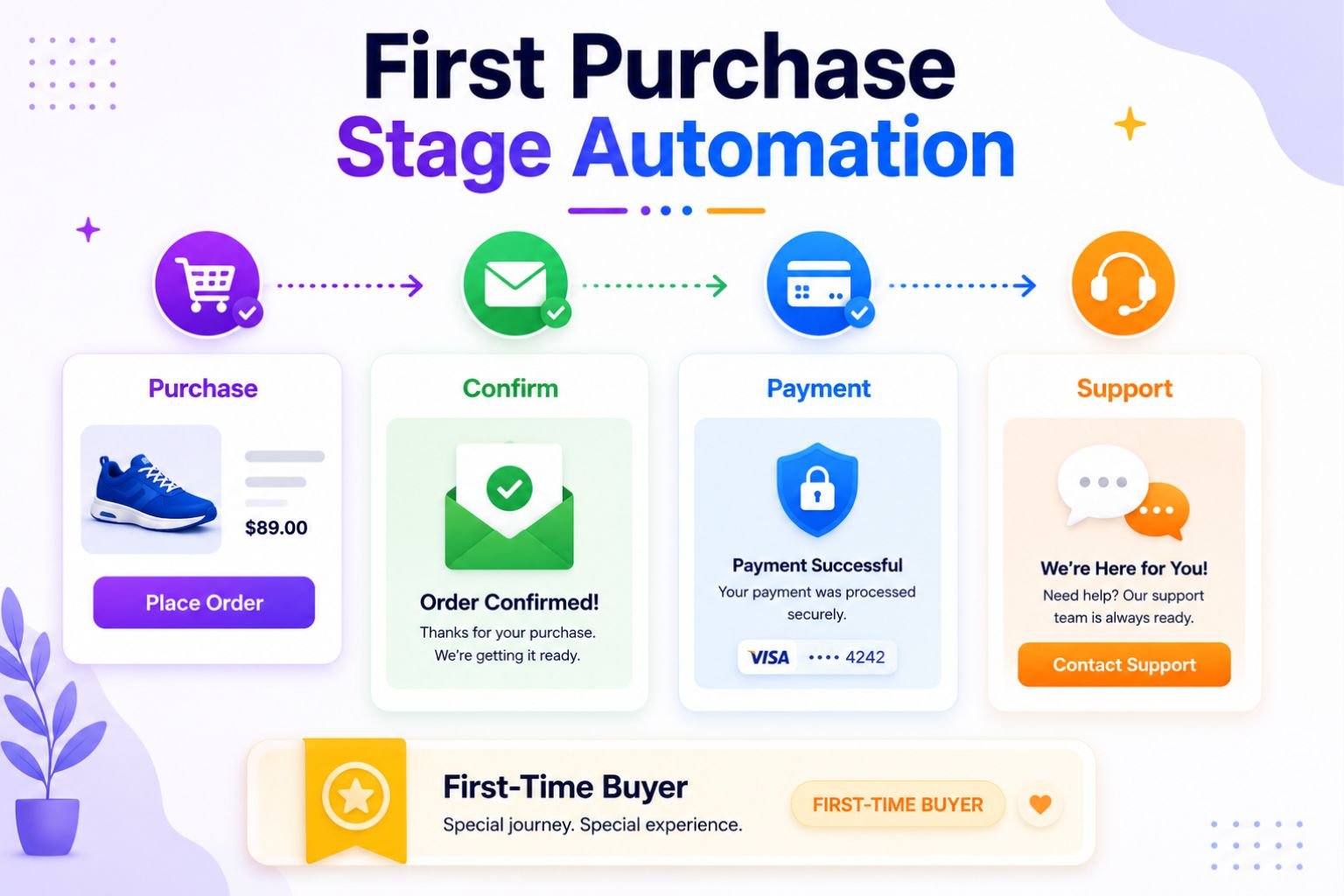
7.1 What Happens at the First Purchase Stage?
At the first purchase stage, the customer completes their first order.
This may be a physical product, a digital product, a bundle, or a subscription. No matter what the product is, the customer has taken a big step.
They have moved from interested shopper to buyer.
But because this is their first time buying from your store, they may still feel unsure. They do not know how reliable your process is yet. They may not know what happens next.
If the customer feels confused after buying, trust can become weak. But if the customer receives clear confirmation and helpful next steps, the purchase feels safe.
7.2 Automation Goal at This Stage
The main goal at the first purchase stage is reassurance.
The customer should feel that the order was received, the payment was handled properly, and the store is still present after checkout.
This is not the best time to overwhelm them with too many offers.
It is the time to make them feel secure.
A good first purchase automation should answer basic questions quickly:
What did I buy?
Was my payment successful?
Where is my order information?
When will I receive the product?
How can I contact support?
When these questions are answered automatically, the buying experience feels smoother.
And a smooth first purchase can make the customer more willing to buy again later.
7.3 Order Confirmation Automation
Order confirmation automation is usually the first workflow after purchase.
It should be sent immediately after the order is placed.
This email or message confirms that the store has received the order and gives the customer important details. It should be clear, simple, and easy to understand.
A good order confirmation may include:
- order number
- product name and details
- payment confirmation
- billing or shipping summary
- download link if the product is digital
- support contact
- next steps
For physical products, the next step may be shipping preparation. For digital products, the next step may be downloading the file, accessing the account, or starting the course.
The customer should not need to guess.
The confirmation message should make them feel, “Okay, everything is fine.”
7.4 Payment and Checkout Confirmation
Payment confirmation is another important part of first purchase automation.
After paying online, customers want proof that the transaction worked. If they do not receive confirmation quickly, they may feel worried. They may wonder if the payment failed, if they were charged twice, or if the store received the order.
Clear payment and checkout confirmation reduces this anxiety.
It also reduces support messages.
For example, if a customer buys an ebook and immediately receives an email saying the payment was successful, the order is confirmed, and the download link is ready, they do not need to contact support.
This creates a better customer experience and shows that the store is organized.
7.5 First-Time Buyer Tagging
First-time buyer tagging means your automation system marks the customer as someone who has completed their first purchase.
This may sound small, but it is very useful.
Once a customer is tagged as a first-time buyer, you can send them the right future workflows. You can move them into a post-purchase workflow, review request workflow, product recommendation workflow, or repeat purchase workflow.
This helps your store communicate based on the customer’s real stage.
For example, a first-time buyer should not keep receiving emails that say, “Use your first order discount.” They already bought.
Instead, they should receive support, product guidance, and later a relevant recommendation.
Tagging keeps the journey organized.
7.6 What to Avoid
The biggest mistake at this stage is leaving customers unsure after they place an order.
If someone pays and receives no clear confirmation, the experience can feel stressful. Even if the order is successful, silence creates doubt.
Another mistake is making the confirmation email too sales-heavy.
A customer who just paid does not always want another offer immediately. They first want reassurance, access, and next steps.
Also avoid unclear download links, missing order details, hidden support contact, or confusing instructions.
The first purchase stage should feel calm and reliable.
7.7 Example
Let’s imagine a digital product store.
A customer buys an ecommerce automation ebook. This is their first purchase from the store, so they may be excited but also cautious.
Immediately after checkout, they receive an order confirmation email.
The email includes the ebook title, order number, payment confirmation, and a clear download link. It also includes a short note explaining how to save the file and where to contact support if the download does not work.
A few minutes later, the customer opens the ebook without confusion.
Now the store can tag this person as a first-time buyer and move them into a post-purchase workflow. Later, the store may send a getting-started email, a useful blog link, a review request, or a recommendation for a related ebook.
That is first purchase stage automation working properly.
It reassures the customer, delivers what they bought, and prepares the next stage of the customer journey.
Section 8: Post-Purchase Stage Automation
The post-purchase stage begins after the customer completes the order.
Many beginners think the sale is the end of the journey. But for the customer, the experience is still continuing. They are waiting for delivery, checking updates, using the product, judging the quality, and deciding whether they feel happy with the purchase.
This stage can shape the customer’s future relationship with your store.
If the post-purchase experience feels confusing, the customer may not come back. But if it feels smooth, helpful, and reassuring, the customer is more likely to trust your brand again.
That is why post-purchase stage automation is so important in ecommerce customer journey automation.
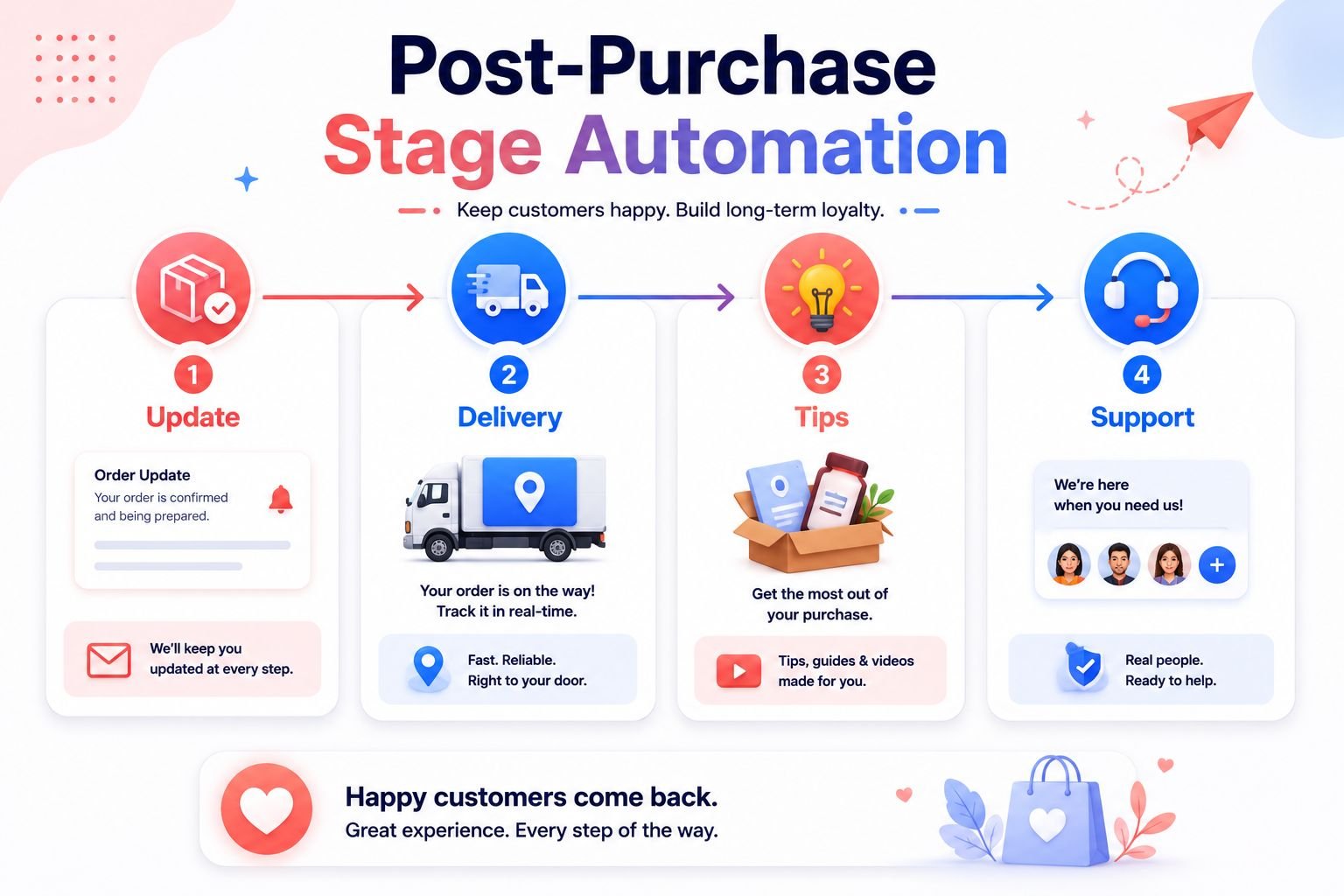
8.1 What Happens After Purchase?
After purchase, the customer is usually waiting for the product, using the product, or evaluating the product.
For physical products, they may wait for shipping confirmation, tracking details, and delivery updates. For digital products, they may look for download access, login details, instructions, or a getting-started guide.
After receiving the product, they begin forming an opinion.
Did the product arrive on time?
Was the packaging good?
Is the quality as expected?
Do they understand how to use it?
Can they contact the store if they need help?
This is where trust can grow or weaken.
A customer who feels supported after buying is more likely to leave a review, recommend the store, and buy again later.
8.2 Automation Goal at This Stage
The main goal at the post-purchase stage is to support the customer and make them feel confident after buying.
This is not the stage to disappear.
A customer should not feel like the store only cared until payment was complete. They should feel that the store is still helping them after the order.
Post-purchase automation can answer questions before the customer asks. It can reduce worry, improve product understanding, and make the buying experience feel more professional.
For example, a customer who receives clear delivery updates does not need to keep wondering where the order is. A customer who receives product usage tips may get better results from the product.
Better support creates better satisfaction.
And better satisfaction can lead to repeat purchases.
8.3 Shipping and Delivery Updates
Shipping and delivery updates are one of the most practical parts of post-purchase automation.
Customers want to know what is happening after they order.
A good shipping update should include the tracking link, expected delivery time, shipping status, and support contact. If there is a delay, the store should communicate that clearly instead of staying silent.
Silence creates anxiety.
Even a short update can make the customer feel reassured.
For example, an email that says “Your order is on the way” with a tracking link is simple, but it helps the customer feel informed. If the delivery is delayed, an honest update with a support option can protect trust.
8.4 Product Usage Tips
Product usage tips help customers get better value from what they bought.
This matters because a customer may buy a good product but still feel disappointed if they do not know how to use it properly.
A skincare product may need clear usage instructions. A shirt may need washing and ironing care tips. A digital product may need a getting-started guide so the buyer knows where to begin.
Helpful post-purchase education can include:
- how to use the product
- how to care for the product
- common mistakes to avoid
- best ways to get results
- beginner setup instructions
- related help articles or guides
These emails do not need to be complicated.
They only need to help the customer feel, “I know what to do next.”
For example, if someone buys a cotton shirt, the store can send tips on washing, drying, and ironing. This helps the shirt last longer and improves the customer’s experience with the product.
When customers get better results, they are more likely to feel satisfied with the purchase.
8.5 Customer Support Automation
Customer support automation helps customers find answers quickly after buying.
This can include FAQ replies, support links, help center pages, chatbot support, return policy links, exchange instructions, or contact forms.
The goal is not to remove human support completely.
The goal is to answer common questions faster and make help easier to find.
For example, if many customers ask about delivery time, sizing, downloads, returns, or product care, your store can create automated replies or helpful support links for those topics.
A chatbot can guide customers to common answers. A support email can include clear contact information. A help center can organize answers in one place.
This reduces repeated manual work for the store owner.
It also helps customers feel supported without waiting too long.
8.6 What to Avoid
The biggest mistake at the post-purchase stage is turning every email into another sales pitch too quickly.
A customer who just bought from your store first needs reassurance, support, and guidance. If every post-purchase email immediately says “Buy more,” the customer may feel like the store only cares about the next sale.
That can weaken trust.
There is nothing wrong with recommending related products later. But the first post-purchase messages should focus on the customer’s current order and experience.
Also avoid unclear tracking links, missing support contact, late delivery updates, or complicated instructions.
Post-purchase automation should make the experience easier, not heavier.
8.7 Example
Let’s imagine a clothing store.
A customer buys a cotton shirt from the website. Immediately after checkout, they receive an order confirmation email. Later, they receive a shipping update with a tracking link and estimated delivery date.
The customer does not need to message the store to ask where the order is.
After delivery, the store sends a short care instruction email. It explains how to wash the cotton shirt, how to dry it properly, and how to avoid damaging the collar or fabric.
This email is not pushing another sale.
It is helping the customer take care of the product they already bought.
A few days later, the store may ask if everything arrived properly or share a support link in case the customer needs help.
That is post-purchase stage automation working well.
When customers feel cared for after the sale, they are much more likely to return when they need something again.
Section 8: Post-Purchase Stage Automation
The review and social proof stage begins after the customer has received and used the product.
This is an important moment because the customer now has a real experience with your brand. They know whether the delivery was smooth, whether the product matched their expectations, and whether they feel satisfied.
If the experience was good, they may be willing to share feedback.
But many happy customers do not leave reviews on their own.
They may forget. They may not know where to write the review. They may feel busy. This is why review and social proof automation is useful. It reminds customers at the right time and makes sharing feedback easier.

9.1 What Happens at the Review Stage?
At the review stage, the customer has had enough time to receive, open, use, or experience the product.
They are no longer just waiting for delivery. They are now forming an opinion.
For a clothing store, they may have tried the shirt. For a skincare store, they may have used the product for a few days. For a digital product store, they may have opened the ebook or used a checklist.
At this point, the customer may be ready to share feedback.
Reviews help future shoppers feel safer. They show that real people have bought from your store and experienced the product. This can reduce doubt and increase trust.
9.2 Automation Goal at This Stage
The main goal at this stage is to collect reviews, testimonials, ratings, and customer feedback.
This is not only for marketing.
Customer feedback also helps you understand what buyers liked, what confused them, and what you may need to improve.
A good review automation workflow should make the process simple. The customer should not need to search for the review page or guess what to write.
The email can include a clear review link, a short thank-you message, and a simple request.
The easier the request feels, the more likely customers are to respond.
9.3 Review Request Workflow
A review request workflow is an automated email or message sent after the customer has had enough time to use the product.
Timing is very important here.
If you ask too early, the customer may not be ready. If you ask too late, they may forget the experience.
For physical products, the review request should usually come after delivery and some usage time. For digital products, it may come after the buyer has had time to download, read, or apply the material.
A simple review request workflow may include:
- a thank-you message
- the product name or image
- a clear review link
- a short question about the experience
- a rating option if available
- support contact in case there is a problem
That last point matters.
If the customer had a problem, they should have a way to contact support instead of only being pushed to leave a review. This shows care and protects the customer experience.
9.4 Testimonial Collection
Strong reviews can become powerful social proof.
You can reuse them on product pages, landing pages, emails, sales pages, homepage sections, and social proof areas of your website.
For example, a customer review about shirt quality can help future clothing buyers. A review about a skincare product’s texture can help new beauty shoppers. A testimonial about an ebook being easy to understand can help digital product buyers feel more confident.
Testimonials work because they sound more real than brand promises.
A store can say, “Our product is helpful,” but a customer saying it often feels more believable.
That is why review automation is not just about collecting stars. It is about collecting real customer language that can build trust across the whole customer journey.
9.5 What to Avoid
The biggest mistake is asking for a review before the customer receives or uses the product.
That feels careless.
If someone buys a candle and receives a review request before the delivery arrives, the message feels automated in the wrong way.
Also avoid making the review request too long or complicated.
Do not ask ten questions when one simple review link is enough. Do not pressure customers with guilt. Do not make them feel forced to write something positive.
The best review request feels polite, simple, and respectful.
Give customers enough time. Ask clearly. Make it easy. And if they had a bad experience, give them a way to get help.
9.6 Example
Let’s imagine a handmade candle store.
A customer orders a vanilla scented candle. After purchase, they receive order confirmation and delivery updates. A few days later, the candle arrives.
The store does not ask for a review immediately on the delivery day.
Instead, it waits a few days so the customer has time to open the package, smell the candle, use it, and experience the product properly.
Then the store sends a review request email.
The email thanks the customer and asks them to share their thoughts about the scent, packaging, and overall experience. It includes a simple review button and a support link in case something was wrong.
This feels natural because the timing matches the customer’s real journey.
That is the review and social proof stage automation working well.
It helps the store collect useful feedback, build trust for future shoppers, and learn from real customer experiences.
Section 10: Repeat Purchase Stage Automation
The repeat purchase stage begins after someone has already bought from your store.
This customer is not a stranger anymore.
They know your brand, your product quality, your checkout process, and your delivery experience. If their first experience was good, they may be open to buying again.
But many customers do not return automatically.
They may forget your store. They may not know what to buy next. They may need the same product again but not remember the timing. Or they may need a small reminder that feels helpful, not pushy.
This is where repeat purchase stage automation becomes valuable.

10.1 What Happens at the Repeat Purchase Stage?
At the repeat purchase stage, the customer has already completed at least one order.
They may have received the product, used it, and formed an opinion about your brand. If they are satisfied, they may be ready for another purchase in the future.
But readiness does not always mean action.
A customer may like your product but still not come back unless your store gives them a reason. They may need a recommendation, a reminder, a refill message, or a relevant offer.
For example, someone who buys a cleanser may later need a moisturizer. Someone who buys a candle may later want another scent. Someone who buys an ecommerce ebook may later need a related template or advanced guide.
The goal is to continue the journey after the first sale.
10.2 Automation Goal at This Stage
The main goal at this stage is to encourage repeat purchases without sounding pushy.
You are not trying to force customers to buy again immediately.
You are trying to recommend something useful based on what they already bought, viewed, or showed interest in.
This matters because repeat purchase automation should feel personal and relevant. A customer should feel, “This makes sense for me,” not “Why am I getting this?”
Good automation at this stage helps customers discover the next helpful product, restock something they may need again, or upgrade their experience.
The message should feel like guidance.
Not pressure.
10.3 Product Recommendation Workflow
A product recommendation workflow suggests products based on purchase history, browsing behavior, or customer interest.
This is one of the most useful repeat purchase automations.
If someone buys a product, your store can recommend related items that naturally fit with that purchase. If someone browses a category several times, your store can recommend products from that category.
For example, a clothing store can recommend matching trousers after someone buys a shirt. A beauty store can recommend sunscreen after someone buys a moisturizer. A digital product store can recommend an automation ebook after someone buys an ecommerce SEO ebook.
The recommendation should not feel random.
It should connect with the customer’s past action.
This is why purchase history is so helpful. It gives your automation system a better idea of what the customer may need next.
10.4 Replenishment Reminder Workflow
A replenishment reminder workflow reminds customers when they may need to buy the same product again.
This works best for products that run out, get used regularly, or need replacing after a period of time.
Examples include skincare products, candles, pet products, household products, food items, coffee, tea, and other repeat-use products.
For example, if a skincare cleanser usually lasts around one month, the store can send a reminder after a few weeks. The email can say something simple like, “Running low on your cleanser?” and include a link to reorder.
This type of message feels helpful because it matches the customer’s real need.
The timing should be realistic.
If you send the reminder too early, it may feel irrelevant. If you send it too late, the customer may have already bought from another store.
A good replenishment workflow helps the customer reorder at the right moment.
10.5 Cross-Sell and Upsell Workflow
Cross-sell and upsell workflows also support repeat purchases.
A cross-sell recommends a related product that goes well with what the customer already bought.
An upsell recommends a higher-value, upgraded, or more complete option.
For example, if a customer buys a basic skincare product, a cross-sell could recommend a matching moisturizer. An upsell could recommend a complete skincare routine bundle.
If a customer buys a beginner ebook, a cross-sell could recommend a checklist or template. An upsell could recommend a full bundle or advanced guide.
Both can work well when they are relevant.
The key is to focus on the customer’s next best step, not just the store’s desire to sell more.
When the offer feels useful, the customer is more likely to trust the recommendation.
10.6 What to Avoid
The biggest mistake at the repeat purchase stage is recommending random products.
If a customer buys a cleanser and receives an email about an unrelated product, the message may feel careless. It shows that the store is not paying attention to the customer’s real interest.
Another mistake is sending too many offers too quickly after the first purchase.
The customer needs time to receive, use, and evaluate the product. If your store pushes another product immediately, it may feel rushed.
Also avoid making every repeat purchase email discount-based.
Discounts can work sometimes, but they should not become the only reason customers come back. Helpful recommendations, useful reminders, and good timing can be more powerful for long-term customer relationships.
Repeat purchase automation should feel thoughtful.
10.7 Example
Let’s imagine a beauty store.
A customer buys a gentle facial cleanser. After purchase, the store sends order updates and product usage tips. The customer receives the cleanser and starts using it.
A few days later, the store does not immediately push another product.
Instead, it waits until the customer has had time to experience the cleanser.
Then the store sends a helpful product recommendation email. It suggests a moisturizer that works well after cleansing and a sunscreen that can complete the basic skincare routine.
Later, around the time the cleanser may start running low, the store sends a replenishment reminder with a simple reorder button.
This feels natural because the emails match the customer’s journey.
The store is not guessing randomly. It is using the customer’s purchase history to recommend useful next steps.
That is repeat purchase stage automation working well.
It helps the customer continue the relationship with the brand and gives them a clear reason to come back again.
Section 11: Loyalty and Win-Back Stage Automation
The loyalty and win-back stage is where ecommerce automation becomes more strategic.
By this point, some customers have already bought more than once. They know your brand, trust your products, and may be ready for a deeper relationship with your store.
But not every customer stays active.
Some customers buy repeatedly. Some become VIP customers. Some stop opening emails. Some do not return for months.
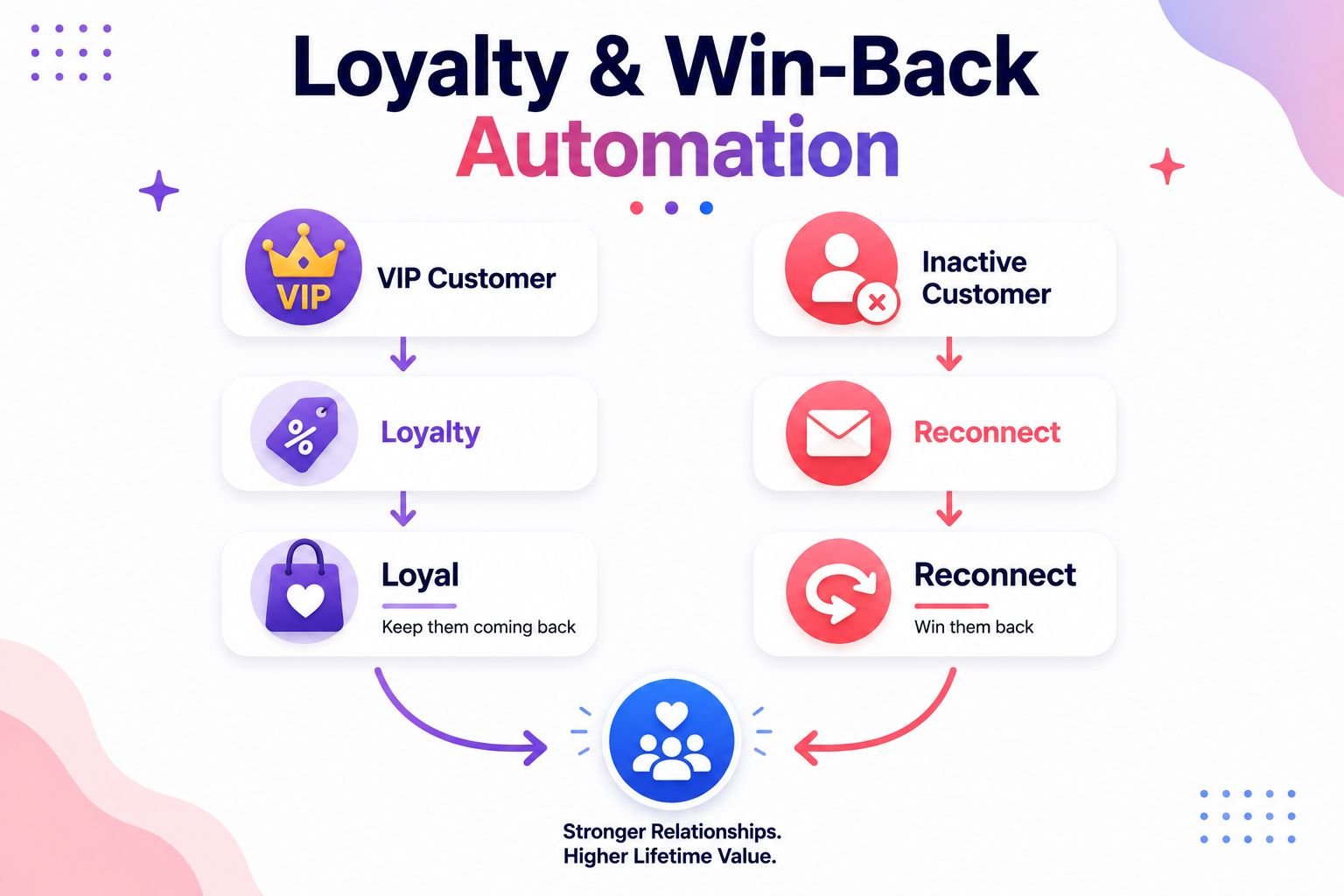
This is why loyalty and win-back stage automation matters. It helps your store treat different customers differently instead of sending the same message to everyone.
11.1 What Happens at the Loyalty Stage?
At the loyalty stage, some customers become repeat buyers.
They may buy from your store more than once, respond to your emails, join special offers, or recommend your products to others. These customers are valuable because they already trust your brand.
They do not always need the same message as a first-time buyer.
A loyal customer may need appreciation, early access, rewards, or personalized recommendations. They may enjoy feeling like they are part of something special.
For example, a customer who has bought five times from a fashion store should not be treated like someone who has never purchased before. They may deserve a VIP offer, a thank-you email, or early access to new arrivals.
Loyalty automation helps your store recognize and reward these customers.
11.2 Loyalty Automation
Loyalty automation is designed to keep your best customers engaged.
The goal is not only to make another sale. The goal is to strengthen the relationship so customers feel valued and connected to your brand.
Loyalty automation can include:
- reward emails
- early access emails
- VIP offers
- birthday emails
- exclusive product updates
- loyalty point reminders
- personalized product recommendations
For example, a beauty store can send early access to a new skincare collection. A clothing store can send a VIP discount to repeat buyers. A digital product store can offer bundle access to customers who already bought several ebooks.
These emails work because they feel more personal.
The customer feels noticed.
And when customers feel appreciated, they are more likely to stay connected.
11.3 Win-Back Automation
Win-back automation is used to reconnect with customers who have not purchased or engaged for a while.
This may include customers who bought once and disappeared, repeat buyers who stopped buying, or subscribers who no longer open emails.
Win-back emails should feel gentle.
The goal is not to blame the customer for being inactive. The goal is to remind them of your brand, show something useful, and invite them back.
A win-back email may include a friendly message, a new product update, a helpful recommendation, a special offer, or a simple question like, “Still interested in hearing from us?”
For example, if a customer bought from your store six months ago and has not returned, your system can send a reconnect email. It may say, “We miss having you here,” or “Here are some new arrivals you may like.”
The message should feel human, not desperate.
Win-back automation gives inactive customers a reason to come back before they forget your brand completely.
11.4 Segmentation for Loyal and Inactive Customers
Segmentation is very important at this stage.
A loyal customer and an inactive customer are not the same.
A repeat buyer is someone who has bought more than once. They may still be active and interested. A VIP customer is usually one of your best customers. They may buy often, spend more, or engage regularly.
An inactive customer is different. They may not have bought recently. They may not open emails. They may have lost interest or simply forgotten about the store.
Each group needs a different message.
Repeat buyers may need product recommendations. VIP customers may need exclusive rewards. Inactive customers may need a gentle reconnect email or a special reason to return.
This is where customer journey automation becomes smarter.
Instead of sending one general campaign to everyone, your store can send messages based on customer behavior, purchase history, and engagement level.
That makes the communication feel more relevant.
11.5 What to Avoid
The biggest mistake is sending the same message to loyal customers and inactive customers.
A loyal customer should not receive the same basic welcome offer as a new subscriber. An inactive customer should not receive the same VIP message as someone who buys every month.
This can make your automation feel careless.
Another mistake is ignoring loyal customers while chasing only new buyers. Many stores spend so much energy attracting new visitors that they forget the customers who already trust them.
That is a missed opportunity.
Also avoid making win-back emails too aggressive. If someone has been inactive, sending too many urgent emails may push them further away.
A better approach is respectful and simple.
Reward loyal customers. Reconnect gently with inactive customers. Give each group a message that matches their stage.
11.6 Example
Let’s imagine a fashion store.
One customer has bought shirts from the store several times. They open emails, click new product links, and usually buy during new collection launches.
The store tags this customer as a repeat buyer or VIP customer.
When a new collection arrives, the store sends them early access before everyone else. The email says they are getting first look at the new arrivals because they are a valued customer.
This makes the customer feel appreciated.
Now imagine another customer who bought once six months ago and has not returned. They have not opened recent emails and have not viewed new products.
The store does not send them the VIP early access email.
Instead, it sends a gentle reconnect email. The message may show a few new arrivals, remind them of the brand, and invite them back with a simple CTA.
This is loyalty and win-back stage automation working properly.
The loyal customer receives recognition.
The inactive customer receives a soft invitation to return.
Both messages support the customer journey, but in different ways.
That is the real power of ecommerce customer journey automation. It helps your store understand where each customer is and communicate in a way that feels relevant, respectful, and useful.
Section 12: Digital Growth Flow Customer Journey Automation Framework
At this point, you have seen how automation supports each stage of the ecommerce customer journey.
Now it is time to connect everything into one simple framework.
The goal is not to build a complicated system on the first day. The goal is to understand the customer journey clearly and create automation that supports each step.
This is where the Digital Growth Flow Customer Journey Automation Framework can help.
It gives beginners a simple path to follow:
Attract → Capture → Nurture → Recover → Support → Prove → Repeat → Retain
Each step has a different purpose, but together they create one connected automation system.

Step 1: Attract
The first step is to attract the right visitors.
Before automation can guide people, your store needs attention from people who may actually care about your products. This can happen through SEO, social media, ads, blog content, product pages, referrals, or marketplace traffic.
At this stage, your job is to make the first impression clear.
Visitors should quickly understand what you sell, who it helps, and why they should stay. Clear offers, useful content, simple navigation, and helpful product pages can make the visitor more willing to explore.
Automation starts better when the visitor already feels interested.
Step 2: Capture
The second step is to capture interest.
A visitor may leave your website and never return if you have no way to reconnect with them. That is why email signup forms, lead magnets, welcome offers, and newsletter invitations are useful.
The goal is not to collect emails randomly.
The goal is to turn anonymous visitors into subscribers who want to hear from your store.
For example, a fashion store may offer 10% off the first order. A digital product store may offer a free checklist. A beauty store may offer a skincare guide.
Once the visitor subscribes, the customer journey can continue.
Step 3: Nurture
The third step is to nurture the subscriber.
This is where trust begins to grow.
A new subscriber may not be ready to buy immediately. They may need to understand your brand, explore your products, read helpful content, and see proof that other customers trust you.
Welcome emails, educational emails, product guides, customer reviews, and brand story emails can help.
Nurture automation should feel helpful, not heavy. It should guide the subscriber naturally toward the first purchase by giving useful information and clear next steps.
When subscribers feel informed, they are more likely to become buyers.
Step 4: Recover
The fourth step is to recover missed opportunities.
Not every interested shopper buys right away. Some browse products and leave. Some add items to cart and abandon checkout. Some get distracted before completing the order.
This is normal in ecommerce.
Browse abandonment workflows and abandoned cart workflows help bring these shoppers back. A browse reminder can show products they viewed.
A cart recovery email can remind them of the product, show the cart link, and include trust signals like return policy or secure checkout.
Recovery automation should not feel aggressive.
It should gently bring the customer back to what they already showed interest in.
Step 5: Support
The fifth step is to support the customer after purchase.
This is one of the most important steps in the whole journey because the customer has already trusted your store with money.
Post-purchase emails, order updates, delivery updates, product usage tips, care instructions, and support links all help the customer feel confident.
For physical products, support may include tracking information and delivery updates. For digital products, it may include download links, access instructions, or a getting-started guide.
Support automation shows that your store still cares after the sale.
That feeling can protect trust and prepare the customer for future purchases.
Step 6: Prove
The sixth step is to prove the value of your store through customer feedback.
After customers receive and use the product, they may be ready to leave a review or testimonial.
Review request automation helps collect this feedback at the right time.
Strong reviews can then support future customers. They can appear on product pages, landing pages, emails, and social proof sections.
This step matters because social proof reduces doubt.
When new shoppers see real customer experiences, they feel safer buying from your store.
Step 7: Repeat
The seventh step is to encourage repeat purchases.
Once someone has bought from your store, the journey should not end. A good customer experience can lead to another purchase, but customers often need a relevant reminder.
Product recommendations, replenishment reminders, cross-sells, and upsells can help.
For example, a customer who buys a cleanser may later need a moisturizer or a refill reminder. A customer who buys an ecommerce ebook may later need a related template or advanced guide.
The key is relevance.
Repeat automation should recommend what makes sense based on the customer’s past action.
Step 8: Retain
The final step is to retain customers over time.
Retention means keeping customers connected, active, and interested in your brand. This can include loyalty workflows, VIP offers, segmentation, early access emails, birthday emails, and win-back emails.
Loyal customers may need appreciation and exclusive treatment. Inactive customers may need a gentle reconnect message.
These groups should not receive the same email.
Retention automation helps your store communicate based on customer behavior, not guesswork.
This is the full Digital Growth Flow framework:
Attract → Capture → Nurture → Recover → Support → Prove → Repeat → Retain
When these steps work together, ecommerce customer journey automation becomes more than a set of emails.
It becomes a complete growth system that guides visitors into subscribers, shoppers into buyers, and buyers into repeat customers.
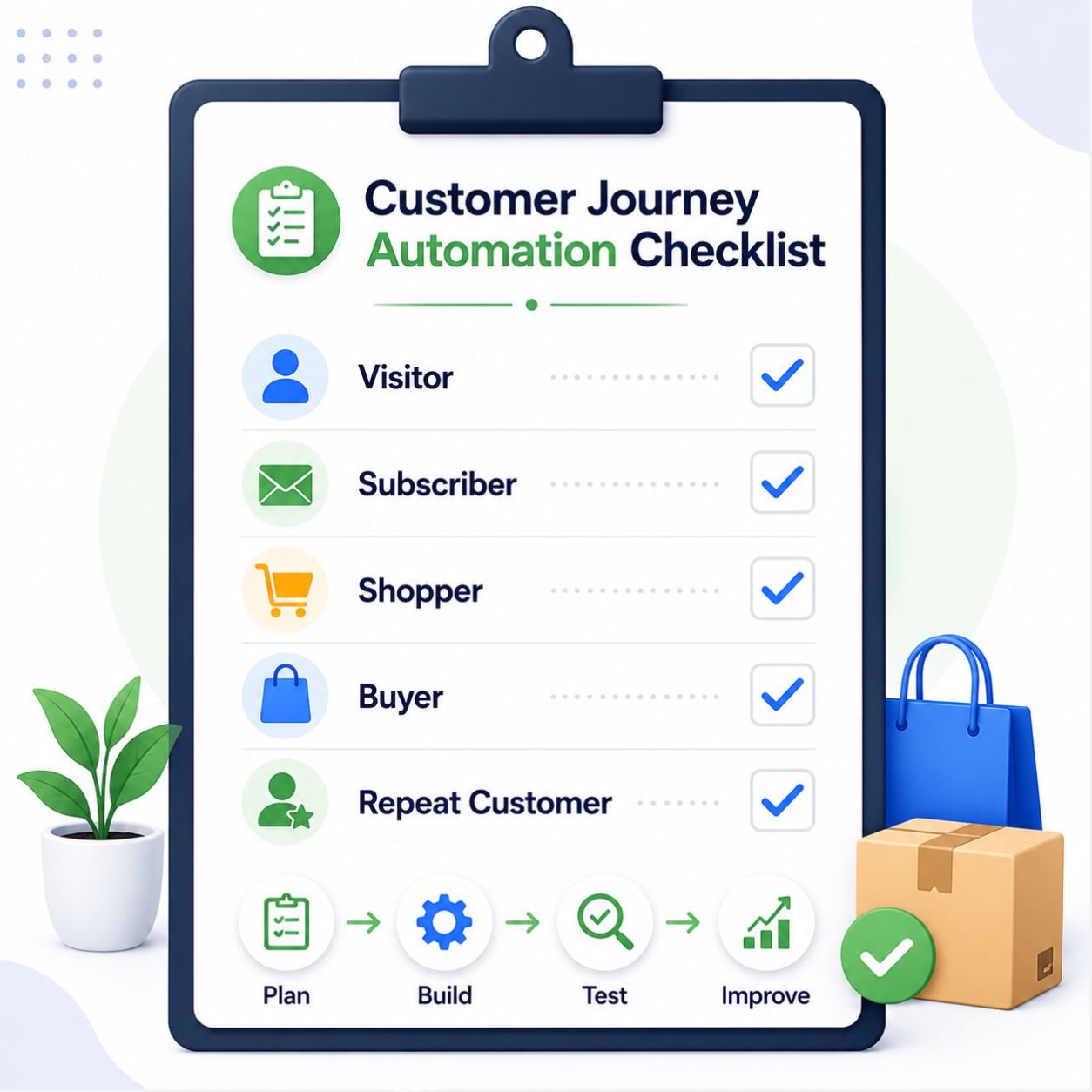
Section 13: Ecommerce Customer Journey Automation Checklist
Before you build or improve your ecommerce customer journey automation system, it helps to review each stage clearly.
A checklist makes the process easier.
Instead of guessing what to automate, you can look at the customer journey step by step. You can see where the customer enters, where they may get stuck, where they need support, and where your store can guide them toward the next action.
This checklist is designed for beginners, so you do not need to complete everything in one day.
Start with the most important stage first. Then improve your automation one workflow at a time.
13.1 Visitor Stage Checklist
The visitor stage is where the customer first discovers your store. Your goal is to make the website clear, helpful, and easy to explore.
Use this checklist to make sure visitors are not lost or overwhelmed.
☐ Website has clear signup option
☐ Welcome offer is simple
☐ Popups are not overwhelming
☐ Product pages guide visitors clearly
☐ Support option is visible
At this stage, clarity is most important. Visitors should understand what you sell, why it matters, and what they can do next.
13.2 Subscriber Stage Checklist
The subscriber stage begins when a visitor shares their email.
Now your job is to build trust and guide them toward the first purchase without sounding too pushy.
☐ Welcome email is active
☐ Promised offer is delivered
☐ Brand introduction is included
☐ Best products or categories are linked
☐ First-purchase CTA is clear
A subscriber should not feel forgotten after signing up. Your welcome email should make them feel they made the right decision by joining your list.
13.3 Consideration Stage Checklist
The consideration stage is where the customer is interested but still deciding.
They may browse products, compare options, read reviews, check pricing, or add something to cart. Your automation should help reduce hesitation.
☐ Browse abandonment workflow is considered
☐ Abandoned cart workflow is active
☐ Product image appears correctly
☐ Cart or product link works
☐ Trust signal is included
☐ Flow stops after purchase
This stage is very important because the customer may be close to buying. A helpful reminder, clear product image, working link, and trust signal can bring them back at the right moment.
13.4 First Purchase and Post-Purchase Checklist
The first purchase and post-purchase stages are where trust must be protected.
After someone buys, they need confirmation, updates, guidance, and support. They should not feel unsure after paying.
☐ Order confirmation is clear
☐ Payment confirmation is sent
☐ Shipping or delivery updates are prepared
☐ Product usage tips are included
☐ Support contact is visible
☐ Customer is tagged as first-time buyer
This stage should make the customer feel safe. A clear confirmation email, delivery update, and helpful support option can make the buying experience feel more professional.
13.5 Review and Repeat Purchase Checklist
After the customer receives and uses the product, your automation can help collect feedback and encourage another purchase.
This should happen naturally, not aggressively.
☐ Review request timing is planned
☐ Review link works
☐ Related product suggestions are relevant
☐ Replenishment timing is considered
☐ Cross-sell or upsell offer is helpful
☐ Repeat customer segment is created
The key here is timing and relevance. Ask for reviews after the customer has had enough time to use the product. Recommend products that actually match their purchase history or interest.
13.6 Loyalty and Retention Checklist
The loyalty and retention stage helps you keep customers connected over time.
Some customers may become repeat buyers. Some may become VIP customers. Others may become inactive and need a gentle reconnect message.
☐ Repeat buyers are identified
☐ VIP customers are segmented
☐ Inactive customers are tracked
☐ Win-back workflow is prepared
☐ Email performance is reviewed
☐ Customer journey is improved over time
This stage helps your store avoid treating every customer the same way. Loyal customers need appreciation. Inactive customers need re-engagement. Both groups need messages that match their stage.
A good ecommerce customer journey automation checklist is not only about launching workflows.
It is about improving the journey over time.
Review your automation regularly. Check whether emails are working, links are correct, customers are moving forward, and repeat purchases are increasing.
When each stage is reviewed carefully, your automation becomes more organized, more helpful, and more effective.
Conclusion: Automate the Journey, Not Just the Task
Ecommerce customer journey automation is not about sending random emails or adding workflows just because other stores use them.
It is about helping customers move from one stage to the next with less confusion and more confidence.
Visitors need guidance. Subscribers need trust. Shoppers need reassurance. First-time buyers need confirmation. Customers need support after purchase. Reviewers need the right timing. Repeat customers need relevant reasons to come back.
When automation supports these moments, the customer journey becomes smoother.
But beginners do not need to automate everything at once.
Start with one important stage. Maybe your store needs a better welcome workflow. Maybe it needs an abandoned cart reminder. Maybe your post-purchase experience needs clearer order updates and product usage tips.
Choose one stage, improve it, test it, and then build the next.
This is how automation becomes manageable.
The goal is not to create a complicated system overnight. The goal is to build a connected journey that helps customers feel guided, supported, and valued.
When the customer journey feels clear, helpful, and connected, automation becomes more than a task.
It becomes a growth system.
Build Your Ecommerce Automation System With Digital Growth Flow
You now understand how ecommerce customer journey automation helps guide visitors, subscribers, shoppers, buyers, and repeat customers.
The next step is building a simple automation system that supports each stage of your store’s growth.
For a beginner-friendly roadmap, explore the Digital Growth Flow Ecommerce Automation Ebook and learn how to build automation workflows that save time, improve customer experience, recover sales, and support long-term ecommerce growth.