
How many sales are you losing simply because your store stops following up?
Most customers do not buy the first time they visit an ecommerce store.
They browse. They compare. They subscribe. They add products to cart. They leave. Some return later, while others never come back.
That is why ecommerce email automation workflows matter.
Instead of sending the same email to everyone, automation lets you send relevant messages based on what a customer actually does.
A new subscriber can receive a welcome email.
A shopper who leaves a cart can get a reminder.
A customer who buys can receive product tips, review requests, recommendations, or a win-back email later.
These workflows help your store stay connected without sending every message manually.
More importantly, they support customers at different stages of the buying journey.
In this guide, you will learn the most useful ecommerce email automation workflows for driving sales, including welcome, cart abandonment, browse abandonment, post-purchase, review, recommendation, win-back, and segmentation workflows.
Because effective email automation is not about sending more emails.
It is about sending the right email at the right moment.
Section 1: What Are Ecommerce Email Automation Workflows?
Before you build email automation for your ecommerce store, you need to understand what a workflow actually means.
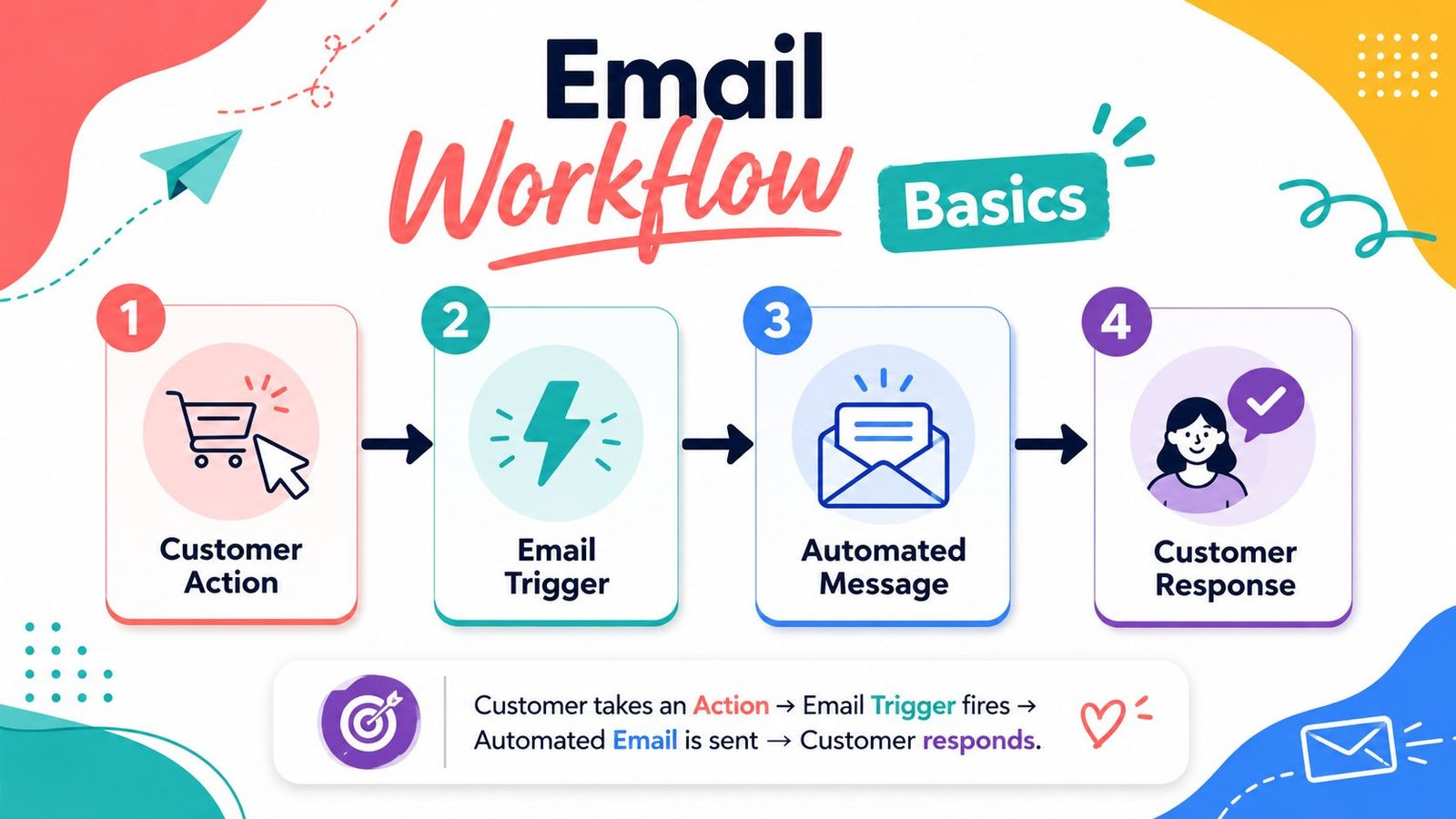
Many beginners hear the word “workflow” and think it sounds technical. But in simple language, an email automation workflow is a planned email journey that happens automatically after a customer takes a specific action.
The customer does something.
Your system responds with the right email.
That is the basic idea.
Instead of sending every message manually, you create the workflow once. Then your ecommerce email automation tool sends the right email at the right time based on customer behavior.
1.1 Simple Definition of Ecommerce Email Automation Workflows
Ecommerce email automation workflows are automated email sequences triggered by customer actions or behavior.
For example, when someone signs up for your email list, they can receive a welcome email automatically. When someone adds a product to cart and leaves, they can receive an abandoned cart reminder.
When someone buys, they can receive a thank-you email, care tips, or a review request.
These workflows can also be triggered by product browsing, purchase history, delivery timing, customer inactivity, or product interest.
In beginner-friendly words, a workflow helps your store send emails without doing the same task manually every time.
It keeps your communication active, even when you are not sitting in front of your laptop.
This is why ecommerce email automation workflows are useful for small online stores. They help you stay connected through welcome emails, cart reminders, post-purchase emails, product recommendations, and win-back messages.
1.2 Workflow vs One-Time Email Campaign
A workflow is different from a one-time email campaign.
A campaign is usually sent once to a selected group of people.
For example, you may send a weekend sale email to your full email list. Or you may send a new product announcement to subscribers interested in fashion, beauty, or digital products.
That is a campaign.
It has one sending time.
A workflow runs automatically when a customer meets a condition or takes an action.
For example, if a customer signs up today, they receive the welcome email today. If another customer signs up next week, they receive the same welcome email next week.
The workflow waits for the trigger.
This is what makes workflows powerful. They work continuously in the background as different customers move through your store.
1.3 How Email Automation Workflows Work
Email automation workflows work through a simple trigger-and-action system.
The trigger is what the customer does.
The action is the email your system sends after that.
For example, a customer joins your email list. That signup is the trigger. Your store sends a welcome email. That email is the action.
Another customer adds a shirt to cart and leaves without buying. That cart abandonment is the trigger. Your store sends a reminder email. That reminder is the action.
This system can also work after purchase.
A customer buys a product. The workflow sends an order confirmation, then a care guide, then a review request after a few days.
The customer does not see the system behind it. They only see helpful emails arriving at the right time.
“Ecommerce email automation workflows are triggered by customer actions and send helpful emails automatically.”
1.4 Why Workflows Are Important for Sales
Ecommerce email workflows are important because they help your store follow up at the right moment.
In ecommerce, timing matters.
A welcome email works best when the customer has just subscribed. An abandoned cart email works best when the customer recently left the cart. A review request works best after the customer has received and used the product.
If you send the right email too late, the moment may be gone.
Workflows solve this problem.
They allow your store to respond based on customer behavior, not random guessing.
A welcome workflow can guide a subscriber toward the first purchase. An abandoned cart workflow can recover a missed sale. A post-purchase workflow can increase customer satisfaction. A win-back workflow can bring inactive customers back.
The purpose is not only to send more emails.
The purpose is to send more relevant emails.
When your emails match the customer’s stage in the buying journey, they feel more useful and less annoying.
1.5 Beginner Example
Let’s imagine a simple online fashion store.
A visitor signs up for 10% off. The store automatically sends a welcome email with the discount code and a short brand introduction.
Later, the visitor browses a few shirts.
They add a blue cotton shirt to the cart but leave before completing the order. A few hours later, the store sends an abandoned cart reminder with the product image and a “Return to Cart” button.
The customer clicks the email and completes the purchase.
After delivery, the store sends care tips for the cotton shirt. A few days later, the customer receives a review request.
This is an ecommerce email automation workflow in action.
The store did not manually send every email. The system followed the customer journey and sent the right messages at the right time.
Email automation workflows help your e-commerce store stay connected from first interest to repeat purchase.
Section 2: Why Ecommerce Email Automation Workflows Drive Sales
Ecommerce email automation workflows drive sales because they help your store stay present at the right moments.
Many customers do not buy in one straight step. They may subscribe today, browse tomorrow, add something to cart next week, and buy later when they feel ready.
If your store does not follow up, many of those moments disappear.
But when your email workflows are set up properly, your store can welcome, remind, support, recommend, and reconnect automatically.
That is how email automation turns normal customer behavior into more sales opportunities.

2.1 They Reach Customers at the Right Moment
Timing is one of the biggest reasons email workflows work.
A welcome email is useful right after someone signs up. At that moment, the customer is interested enough to join your list, so it is the perfect time to introduce your brand, deliver the promised offer, and guide them toward the first purchase.
An abandoned cart email works after cart abandonment. The customer already added a product to cart, so a reminder a few hours later feels relevant.
A review request works after delivery. If you ask too early, the customer may not have received or used the product yet. But if you ask at the right time, the request feels natural.
This is why workflows are better than random emails.
They respond to the customer’s stage in the journey.
2.2 They Recover Missed Sales
Not every missed sale is gone forever.
Some customers leave because they get distracted. Some leave because they are still comparing options. Some forget to come back. Some need more reassurance before buying.
Email automation workflows can bring these customers back.
An abandoned cart workflow reminds customers about products they added to cart. A browse abandonment workflow follows up when someone views a product but does not add it to cart. A win-back workflow reconnects with customers who have not bought or engaged for a while.
For example, a customer views a pair of shoes, leaves the website, and forgets about them. A browse abandonment email can remind them of the product and show similar options.
This creates another chance to win the sale.
2.3 They Increase Repeat Purchases
Sales growth does not only come from new customers.
It also comes from customers who buy again.
Ecommerce email automation workflows can help turn one-time buyers into repeat customers. After someone buys, your store can send post-purchase emails, product recommendations, replenishment reminders, or related product suggestions.
For example, a customer buys a cotton shirt. After delivery, the store sends care tips. Later, the store recommends matching trousers or another shirt in a different color.
This feels helpful because the recommendation connects to the customer’s previous purchase.
Replenishment reminders can also work well for products people use repeatedly, such as skincare, supplements, candles, pet products, or household items.
Instead of waiting for the customer to remember, the workflow reminds them at the right time.
2.4 They Build Customer Trust
Good email workflows do more than sell.
They build trust.
When customers receive helpful emails, they feel guided instead of ignored. A welcome email explains the brand. A post-purchase email gives product tips. A delivery update reduces confusion. A support email answers common questions.
This kind of communication makes the customer journey feel smoother.
For example, if a customer buys a digital product, they may wonder how to access it or how to start using it. A post-purchase workflow can send the download link, explain the next step, and offer support.
That helps the customer feel safe after buying.
Trust matters because people are more likely to buy from brands that communicate clearly.
2.5 They Save Time for Store Owners
Email workflows also save time.
Without automation, store owners may need to send welcome messages, cart reminders, review requests, and follow-ups manually. That becomes difficult as the store grows.
A workflow turns repeated communication into a system.
You create the email once. You choose the trigger and timing. Then the automation sends it whenever the right customer action happens.
This helps beginners stay consistent without doing everything by hand.
It also reduces mistakes.
When the system handles repeated tasks, there is less chance of forgetting to follow up with a customer or missing an important sales opportunity.
2.6 They Make Small Stores Feel More Professional
Small ecommerce stores do not need to look small in the customer experience.
When your emails arrive at the right time, your store feels organized. A customer signs up and receives a welcome email. They leave a cart and receive a reminder. They buy and receive useful after-purchase guidance.
This creates confidence.
The customer feels that the store is active, prepared, and serious about service.
For a small fashion, beauty, handmade, or digital product store, this can make a big difference. You may not have a large team, but your workflows can help you communicate like a professional brand.
That is why ecommerce email automation workflows drive sales.
They do not only push products.
They help you stay connected with customers at every important stage of the buying journey.
Section 3: What Makes a Good Ecommerce Email Automation Workflow?
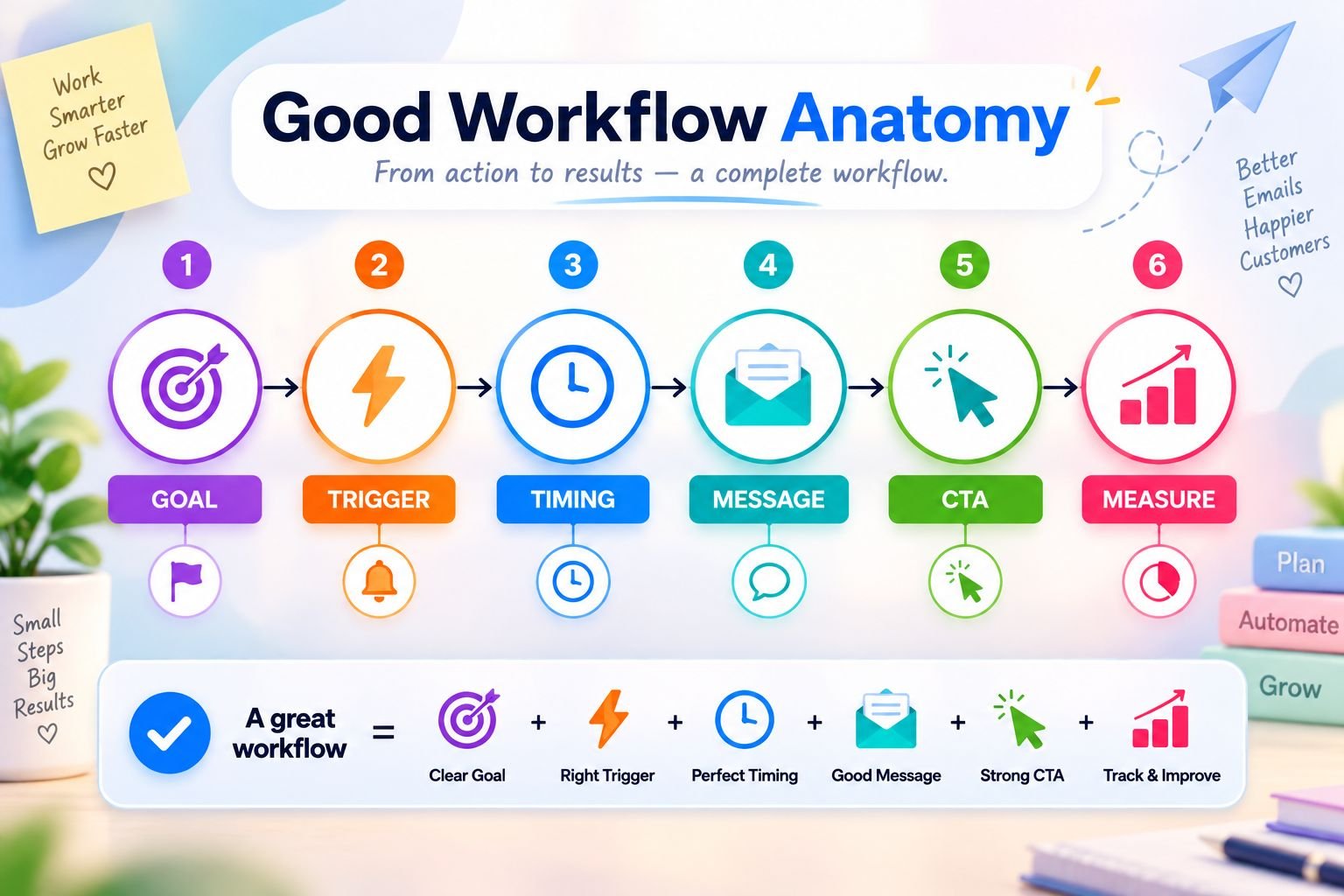
A good ecommerce email automation workflow is not just a set of emails.
It is a planned customer journey.
Every email should have a reason. Every trigger should make sense. Every message should guide the customer toward the next helpful step.
This is where beginners should be careful.
It is easy to create too many emails too quickly. But a strong workflow does not start with more emails. It starts with a clear purpose.
3.1 A Clear Goal
Every email automation workflow should have one clear goal.
Before creating a workflow, ask yourself: “What should this workflow help my store achieve?”
For example, a welcome workflow should welcome new subscribers and guide them toward the first purchase. An abandoned cart workflow should recover carts. A review request workflow should collect customer reviews. A post-purchase workflow should support customers after buying.
A win-back workflow should reconnect with inactive customers.
When the goal is clear, the message becomes easier to write.
Without a goal, the workflow can become confusing. You may add too many messages, too many offers, or too many CTAs.
For beginners, it is better to keep each workflow focused on one main result.
One workflow, one purpose.
3.2 The Right Trigger
A good workflow needs the right trigger.
The trigger is the customer action that starts the workflow. It should be based on meaningful behavior, not random guessing.
For example, a signup can trigger a welcome email. Cart abandonment can trigger an abandoned cart email. A purchase can trigger a thank-you email or post-purchase guide. A delivery event can trigger a review request.
Product views can trigger browse abandonment emails. Inactivity can trigger win-back emails.
The trigger matters because it makes the email relevant.
If someone just joined your list, a welcome email feels natural. If someone left a product in the cart, a cart reminder feels helpful. If someone has not purchased for a long time, a reconnect email can make sense.
But if the trigger does not match the message, the email may feel strange.
A good workflow starts when the customer action gives you a clear reason to communicate.
3.3 The Right Timing
Timing can change the result of an email workflow.
Some emails should be sent quickly. Others need waiting time.
For example, a welcome email should usually arrive soon after signup. If someone signs up for a discount and receives the code three days later, the moment may be gone.
An abandoned cart email should also be sent while the product is still fresh in the customer’s mind.
But a review request should not be sent too early. If the customer has not received or used the product yet, asking for a review feels careless.
Post-purchase emails also need thoughtful timing. A thank-you email can be sent quickly, but product care tips may be better after delivery.
Good timing makes the email feel useful.
Bad timing makes even a good email feel wrong.
3.4 A Helpful Message
A strong ecommerce email automation workflow should help the customer, not only sell to them.
This is very important.
Customers do not want to feel like every email is pushing them to buy something. They want useful information, clear guidance, and a reason to trust your store.
For example, a post-purchase email can share care instructions for a cotton shirt. A beauty store can send product usage tips. A digital product store can explain how to access the ebook and where to start.
These messages still support sales.
But they do it by helping the customer first.
Helpful emails build trust. And trust makes future sales easier.
3.5 One Clear CTA
Every workflow email should guide the customer toward one main action.
That action is the CTA, or call-to-action.
For example, a welcome email may ask the subscriber to shop best sellers. An abandoned cart email may ask the customer to return to cart. A review request email may ask them to leave a review.
The CTA should be clear, visible, and easy to understand.
If one email has too many CTAs, the customer may feel confused. They may not know whether to shop, read a blog, follow social media, check a product, or leave a review.
This is why one main CTA works better.
It keeps the email focused.
A good workflow email should make the next step simple. The customer should not have to think too much about what to do.
3.6 Simple Measurement
A good workflow should also be measured.
Beginners do not need advanced reports at first. But you should still understand whether your emails are working.
If you never check the results, you are only guessing.
Start with a few simple numbers:
- Open rate shows whether people are opening your emails.
- Click rate shows whether people are clicking your CTA.
- Conversions show whether emails are leading to sales or actions.
- Recovered sales show how much revenue your recovery workflows bring back.
- Repeat purchases show whether customers are buying again.
- Unsubscribes show whether your emails feel too frequent or irrelevant.
These numbers help you improve.
If your open rate is low, your subject line may need work. If your click rate is low, your CTA or message may not be clear enough. If people click but do not buy, the issue may be the product page, checkout, price, or trust signals.
Measurement helps you make better decisions.
A good ecommerce email automation workflow does not need to be perfect from the beginning.
It needs a clear goal, the right trigger, smart timing, a helpful message, one clear CTA, and simple measurement.
When these pieces work together, your email workflow becomes more than automation.
It becomes a sales system that supports customers at the right moment.
Section 4: Welcome Email Workflow
A welcome email workflow is one of the best ecommerce email automation workflows for beginners.
Why?
Because it starts when the customer is already interested.
Someone visited your store, saw your signup form, and decided to join your email list. That is not a small action. It means they want something from your brand, even if they are not ready to buy yet.
A welcome workflow helps you turn that first interest into trust, connection, and eventually, sales.
4.1 What Is a Welcome Email Workflow?
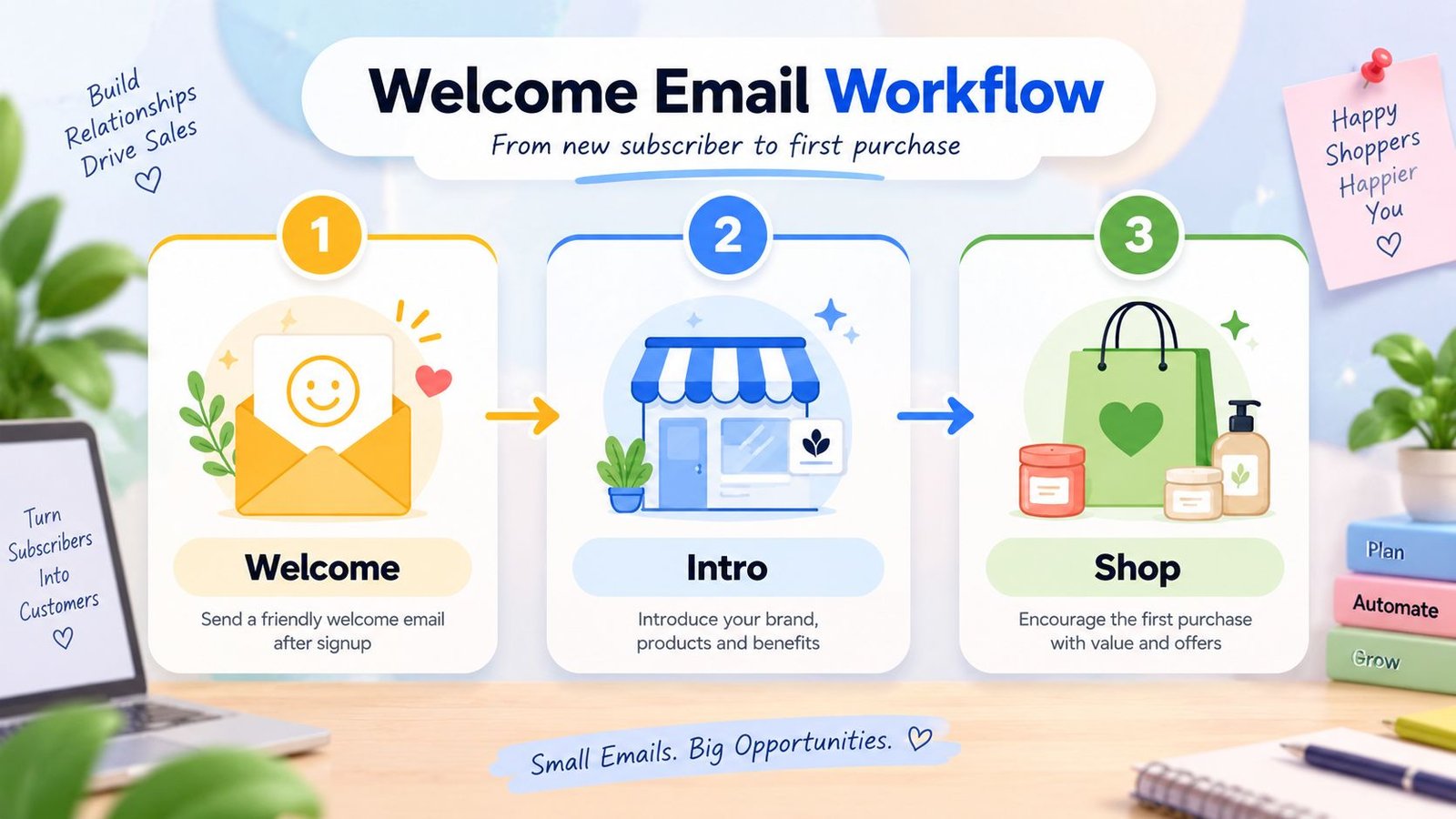
A welcome email workflow is an automated email sequence sent when someone joins your email list or creates an account.
For example, a visitor may sign up to get 10% off their first order. As soon as they enter their email, your store sends a welcome email automatically.
That first email may deliver the discount code, introduce the brand, and guide the subscriber toward popular products.
This workflow is important because it creates the first real email conversation between your store and the customer.
The customer may not buy immediately.
But your welcome email can help them understand who you are, what you sell, and why they should trust your store.
4.2 Why It Drives Sales
A welcome email workflow can drive sales because new subscribers are usually more interested than cold visitors.
They did not randomly receive your email. They chose to join your list.
That means they are already curious about your products, your offer, or your brand.
This is the right moment to guide them.
For example, if someone signs up for a discount on a beauty store website, they may already be thinking about buying a moisturizer, serum, or cleanser. A good welcome email can deliver the discount code and show them where to start.
Without that email, the subscriber may forget your store.
With the right welcome workflow, you keep the conversation alive.
You can introduce your best products, explain your brand promise, show customer reviews, and make the first purchase feel easier.
That is why the welcome workflow is not just a polite greeting.
It is a sales opportunity.
4.3 What to Include
A strong welcome email should not only say “welcome.”
It should help the subscriber take the next step.
Start with a short brand introduction. Tell the reader what your store offers and who it helps. Keep it simple and clear.
Then deliver the subscriber benefit if you promised one. If they signed up for 10% off, give the discount code clearly. Do not make them search for it.
You can also include best-selling products or popular categories. This helps new subscribers avoid confusion and find something interesting quickly.
Trust signals are also useful. Add customer reviews, ratings, secure checkout information, return policy details, or a simple support option if it fits naturally.
Finally, include one clear CTA.
For example, “Shop Best Sellers,” “Use Your Discount,” or “Explore New Arrivals.”
A welcome email should feel warm, useful, and easy to act on.
4.4 Beginner Welcome Email Sequence
Beginners do not need a long welcome sequence.
A simple 2–3 email workflow is enough to start. Each email should have a clear job.
- Email 1: Welcome the subscriber and deliver the promised offer.
- Email 2: Introduce the brand story and show best-selling products.
- Email 3: Share a helpful product guide or first-purchase reminder.
The first email should arrive immediately after signup. If the customer signed up for a discount code, they expect it right away.
The second email can arrive one or two days later. This email can explain your brand values, product quality, customer promise, or best product categories.
The third email can guide the subscriber toward buying. For example, a beauty store can send “How to Choose the Right Moisturizer” or “Best Products for Your Daily Routine.”
This type of email feels helpful, not pushy.
It gives the customer a reason to return to your store.
4.5 Example
Let’s imagine a beginner beauty store.
A visitor lands on the website and sees a signup offer: “Get 10% off your first order.”
They enter their email.
Within a few seconds, they receive a welcome email with the discount code. The email says hello, thanks them for joining, and briefly explains that the store offers beginner-friendly skincare products.
Then it shows a few product categories, such as cleansers, moisturizers, sunscreens, and serums.
The email also includes a short customer review and a clear button that says, “Shop Best Sellers.”
This is a simple welcome email, but it does several important things.
It delivers the promised offer. It introduces the brand. It gives direction. It builds trust. And it gives the customer a clear next step.
That is what a good welcome email workflow should do.
4.6 Mistake to Avoid
One common beginner mistake is sending only a discount code.
A discount can attract attention, but it does not build a relationship by itself.
If your welcome email only says “Here is your 10% off code,” the customer may use it once and forget your brand. Or they may not use it at all because they still do not know what to buy.
A better welcome email should guide them.
Tell them what your store is about. Show them where to start. Add trust signals. Make the first purchase feel easy.
The goal is not only to give a coupon.
The goal is to welcome the subscriber into your brand experience.
When done well, a welcome email workflow can turn a new subscriber into a first-time buyer and start a stronger customer relationship from the very beginning.
Section 5: Abandoned Cart Email Workflow
An abandoned cart email workflow is one of the strongest ecommerce email automation workflows for driving sales.
It works because the customer has already shown interest.
They did not only visit your store. They did not only look at a product. They added something to the cart, which means they were already moving toward buying.
But then they stopped.
A good abandoned cart workflow helps bring that customer back without sounding pushy.

5.1 What Is an Abandoned Cart Workflow?
An abandoned cart workflow is an automated email sequence sent when a customer adds products to cart but leaves before completing the purchase.
For example, a customer adds a blue shirt to the cart, checks the size, and then leaves the website. Maybe they got distracted. Maybe they wanted to think more. Maybe they were unsure about the shipping cost.
The abandoned cart workflow starts after that action.
The system notices that the customer left without buying and sends an email reminder after a set time.
This workflow can be simple. For beginners, even one abandoned cart email is better than no follow-up at all.
But as your store grows, you can create a small sequence that reminds, reassures, and gently brings the customer back.
5.2 Why It Drives Sales
Abandoned cart workflows drive sales because cart abandoners are not cold visitors.
They already showed buying interest.
A person who adds a product to cart is much closer to buying than someone who only visits your homepage. They have already chosen a product, checked some details, and taken an important step in the buying journey.
That makes follow-up more valuable.
For example, if a customer adds a shirt to cart and leaves, your store has a real chance to recover that sale. A simple reminder can bring the product back to their attention.
Sometimes customers do not leave because they dislike the product.
They leave because they get busy, compare options, feel unsure, or need one more reason to trust the store.
An abandoned cart workflow helps solve that problem.
5.3 What to Include
A strong abandoned cart email should be clear and easy to act on.
Start with the product image and product name. This reminds the customer exactly what they left behind.
Then include the cart link or checkout link. The customer should not have to search for the product again.
Add one clear CTA, such as “Return to Cart,” “Complete Your Order,” or “Continue Checkout.”
Trust signals can also help. You can include a customer review, return policy reminder, secure checkout note, delivery information, or product guarantee.
A support option is useful too. Some customers abandon carts because they have questions about size, delivery, payment, or returns.
You can add a simple line like, “Have a question before ordering? Reply to this email and we’ll help.”
An incentive can also work, but use it carefully. A small discount, free shipping, or limited-time offer can help bring some shoppers back. But if you offer discounts too early every time, customers may learn to wait.
5.4 Beginner Abandoned Cart Sequence
Beginners do not need a long abandoned cart sequence.
A simple three-email workflow is enough.
- Email 1: Send a friendly reminder with the product image and cart link.
- Email 2: Build trust with reviews, benefits, return policy, or support details.
- Email 3: Send a gentle incentive or final reminder if needed.
The first email can go out a few hours after cart abandonment. It should be simple and friendly.
The second email can arrive around the next day. It should answer doubts and make the customer feel safer.
The third email can arrive two or three days later. This can include a careful incentive, such as free shipping or a small discount, if it fits your profit margin.
Each email should have a different purpose.
If all three emails say the same thing, customers may ignore them.
5.5 Example
Let’s imagine an online fashion store.
A customer visits the store and finds a blue cotton shirt. They like the color, choose their size, and add it to the cart.
Then they leave without buying.
A few hours later, the store sends the first abandoned cart email. It shows the blue shirt, includes a friendly message, and adds a clear button that says “Return to Cart.”
The customer opens the email but does not buy yet.
The next day, the store sends a second email. This time, the email includes a size guide link, a short customer review, and a reminder that easy returns are available.
Now the customer feels more confident.
They click the button, return to the checkout page, and complete the order.
This is why abandoned cart workflows are powerful. They do not create interest from nothing. They follow up with interest that already existed.
5.6 Mistake to Avoid
One big mistake beginners make is offering discounts too early.
A discount can help, but it should not be the first message every time. If customers learn that leaving the cart always brings a coupon, they may stop buying at full price.
Start with a reminder first.
Then use trust and reassurance.
Only use an incentive when it is truly needed.
Another mistake is sending abandoned cart emails after the customer already bought. This makes the automation look broken and can confuse the customer.
Before turning on your workflow, test the stop rule. Once the customer completes the purchase, the remaining abandoned cart emails should stop automatically.
A good abandoned cart workflow should feel helpful, not aggressive.
When it reminds the customer clearly, answers doubts, and makes checkout easy, it can recover missed sales without damaging trust.
Section 6: Browse Abandonment Workflow
Not every interested customer adds a product to cart.
Some visitors only browse.
They may view a product page, check a category, compare a few items, and leave without taking the next step. At first, this may not look as important as cart abandonment. But browsing still shows interest.
That is why a browse abandonment workflow can be useful.
It helps your ecommerce store follow up with people who showed interest, even if they were not ready to add anything to cart yet.
6.1 What Is a Browse Abandonment Workflow?
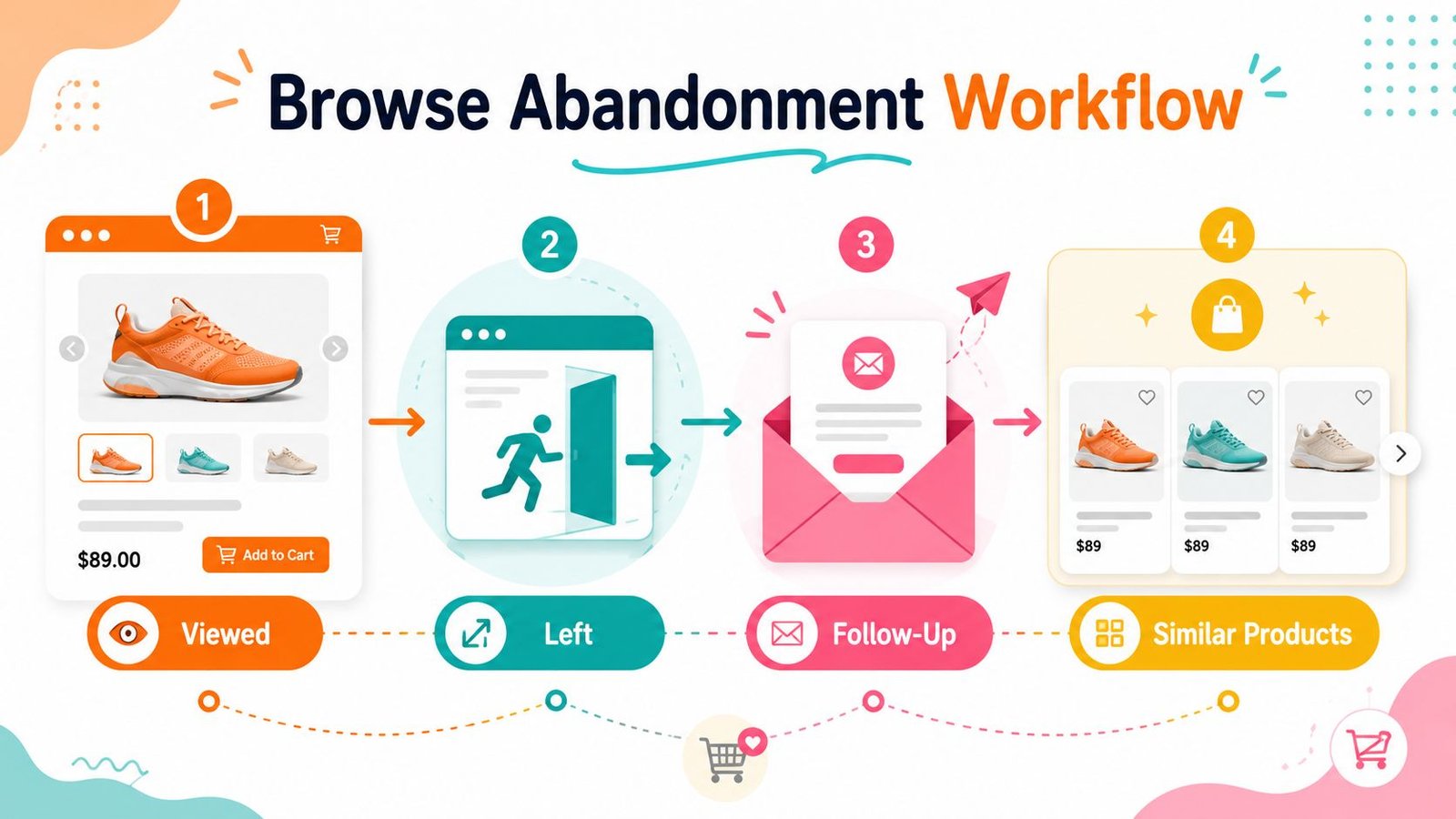
A browse abandonment workflow is an automated email sequence sent when a visitor views a product or category but leaves without adding anything to cart.
For example, someone visits your online store and looks at a wall art collection. They click on one or two designs, spend some time viewing the product photos, and then leave the website.
They did not add anything to cart.
But their browsing behavior still tells you something.
It tells you they were interested enough to look.
A browse abandonment email can remind them about the product or category they viewed and guide them back if they want to continue exploring.
This workflow usually works best when the visitor is already on your email list. If you do not have their email address, your store cannot send a follow-up email.
6.2 Why It Drives Sales
Browse abandonment workflows drive sales because browsing is often the first sign of buying interest.
A customer may not be ready to buy yet, but they are paying attention. They may be comparing products, checking prices, looking at colors, or deciding if the product fits their needs.
If your store does nothing after that visit, the customer may forget.
But a simple follow-up email can bring the product back to their mind.
For example, if someone views a home decor item and leaves, an email later can say, “Still thinking about this design?” Then it can show the item and similar products.
This does not force the customer to buy.
It simply helps them continue where they left off.
That extra reminder can turn quiet browsing into a future sale.
6.3 Browse Abandonment vs Abandoned Cart
Browse abandonment and abandoned cart workflows are similar, but they happen at different stages.
Browse abandonment happens before the customer adds anything to cart.
Abandoned cart happens after the customer adds something to cart but leaves before buying.
This difference matters because the level of interest is not the same.
A cart abandoner is usually closer to buying. They selected a product and took a stronger action.
A browse abandoner showed interest, but the interest is lighter. They may only be exploring, comparing, or thinking.
So the email tone should be different.
An abandoned cart email can be more direct because the customer already started the buying process. A browse abandonment email should feel softer and more helpful.
It should invite the customer back, not push them.
6.4 What to Include
A browse abandonment email should be simple and relevant.
The goal is to remind the customer what they viewed and make it easy to continue browsing.
You can include:
- the product or category they viewed
- related products or similar options
- a helpful buying guide
- customer reviews or ratings
- a link back to the product or category page
For example, if someone viewed a wall art category, the email can show a few popular wall art designs. It can also include a short line like, “Explore designs that match your space.”
If someone viewed skincare products, the email can guide them to a product quiz or routine guide.
If someone viewed shirts, the email can show similar colors, styles, or best sellers.
The key is relevance.
Do not send a random promotional email. Send something connected to what the visitor actually viewed.
6.5 Example
Let’s imagine a home decor store.
A visitor comes to the website and views a collection of wall art. They click on a botanical print, look at the size options, and check the product photos.
But they do not add it to cart.
Then they leave.
Later, the store sends a browse abandonment email. The email shows the wall art they viewed and says, “Still decorating your space?”
Below that, the email shows a few similar wall art designs. It also includes a button that says, “Continue Browsing.”
This email feels natural because it matches the customer’s interest.
The store is not pushing a random product. It is helping the customer return to a product category they already explored.
That is what makes browse abandonment workflows useful.
They reconnect with early interest before it disappears completely.
6.6 Mistake to Avoid
The biggest mistake with browse abandonment emails is making them too aggressive.
Remember, the customer did not add anything to cart yet.
They only browsed.
So the email should not sound like a final sales push. It should not pressure them with heavy urgency or immediate discounts.
For example, saying “Buy now before it is gone” may feel too strong for someone who only viewed a product once.
A better message would be softer:
“Still looking for the right style? Here are a few options you may like.”
That feels more helpful.
Browse abandonment emails should guide, not chase.
Use them to remind customers, show related products, and help them continue exploring. When the message feels relevant and respectful, this workflow can bring visitors back without making your brand feel pushy.
Section 7: Post-Purchase Email Workflow
A post-purchase email workflow starts after the customer buys.
Many beginners think the sale is finished once the order is placed. But in ecommerce, the customer journey does not end at checkout.
In many ways, the post-purchase stage is where the next sale begins.
This is the moment when your store can build trust, reduce confusion, improve the customer experience, and prepare the customer for a future purchase.
A good post-purchase workflow helps the customer feel supported after buying, not forgotten.
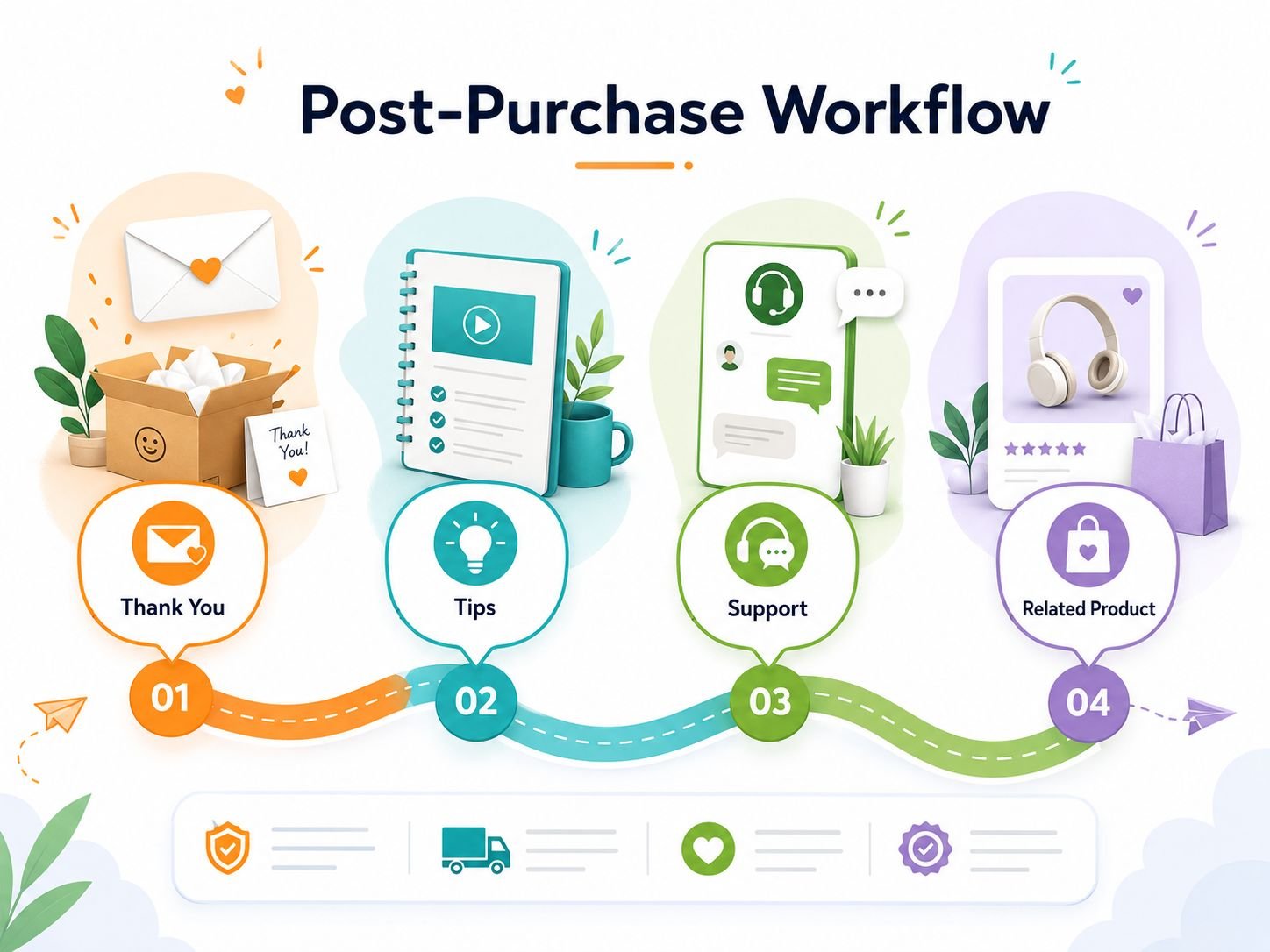
7.1 What Is a Post-Purchase Workflow?
A post-purchase workflow is an automated email sequence that starts after a customer completes an order.
It can include a thank-you email, order reassurance, delivery information, product usage tips, care instructions, review requests, or related product recommendations.
The exact emails depend on what you sell.
For example, a clothing store may send care instructions after delivery. A beauty store may send product usage tips. A digital product store may send access details and a getting-started guide.
The purpose is simple.
After the customer buys, your store continues the conversation in a helpful way.
This makes the buying experience feel more complete.
7.2 Why It Drives Sales
Post-purchase emails drive sales because happy customers are more likely to buy again.
A customer who already bought from you is not a stranger anymore. They know your brand, your product, and your buying process.
If the first experience feels smooth, they may return.
Post-purchase workflows help with that. They can reduce support questions by explaining what happens next. They can improve satisfaction by showing customers how to use or care for the product. They can also introduce related products at the right time.
For example, if someone buys a cotton shirt, they may later need matching trousers, another color, or a styling suggestion.
But you should not rush.
The first goal after purchase should be support. Sales can come later when the customer feels confident and satisfied.
7.3 What to Include
A strong post-purchase email workflow should make the customer feel informed and cared for.
Start with a thank-you message. It does not need to be long, but it should sound warm and genuine.
Then include order details or reassurance. Customers like knowing that their order was received and what will happen next.
Delivery information is also useful, especially for physical products. If the item is being packed, shipped, or delayed, clear communication can prevent confusion.
Product usage tips and care instructions are also powerful. They help customers get better value from what they bought.
For example, a fashion store can explain how to wash a cotton shirt. A skincare store can explain when to use a serum. A digital product store can explain where to start inside an ebook.
You can also include related product suggestions, but only when they feel relevant.
Finally, add a support contact. If the customer needs help, they should know where to go.
7.4 Beginner Post-Purchase Sequence
Beginners do not need a long post-purchase sequence.
A simple three-email workflow is enough to start.
- Email 1: Thank the customer and reassure them that the order is confirmed.
- Email 2: Send product usage tips, care instructions, or a helpful guide.
- Email 3: Recommend a related product or the next best step.
The first email should arrive soon after purchase. It should confirm the order and make the customer feel safe.
The second email can be sent after delivery or after the customer has had time to use the product. This email should focus on helping them enjoy the product better.
The third email can come later. This is where you can suggest something related, such as a matching product, refill, upgrade, or next learning resource.
This sequence works because it does not jump straight into selling.
It supports first, then recommends.
7.5 Example
Let’s imagine a clothing store.
A customer buys a cotton shirt. Right after purchase, they receive a thank-you email with order confirmation and delivery information.
After the shirt is delivered, the store sends another email with care instructions.
The email explains how to wash the shirt, how to dry it, and how to keep the fabric looking fresh. It may also include a simple styling tip, such as pairing the shirt with navy trousers or beige chinos.
A few days later, the store sends a related product suggestion.
It may recommend matching trousers, another shirt color, or a belt that fits the look.
This feels natural because the recommendation connects to the original purchase.
The customer does not feel like the store is randomly pushing products. They feel like the store is helping them get more value from what they already bought.
7.6 Mistake to Avoid
The biggest mistake beginners make with post-purchase emails is turning every message into a sales pitch.
A customer has just bought from you. They need reassurance first.
If the first post-purchase email immediately says, “Buy more,” it can feel too aggressive. The customer may feel like the store cares more about the next sale than the current experience.
Start with support.
Thank them. Confirm the order. Explain what happens next. Help them use the product. Make them feel confident about buying from you.
Then, when the timing feels right, recommend something useful.
A good post-purchase workflow should create a better customer experience before it asks for another sale.
When customers feel supported after buying, they are more likely to trust your store, leave a review, recommend your brand, and come back again.
Section 8: Review Request Email Workflow
A review request email workflow helps your store collect customer feedback after a purchase.
Many beginners forget this step.
They focus on getting the sale, shipping the product, and moving to the next customer. But reviews are one of the strongest trust signals an ecommerce store can build over time.
A happy customer may be willing to share their experience.
But they often need a simple reminder.
That is where a review request workflow helps.

8.1 What Is a Review Request Workflow?
A review request workflow is an automated email sequence that asks customers to leave a review after they have had enough time to receive and use the product.
This workflow usually starts after delivery, product access, or a set number of days after purchase.
For example, if someone buys a candle, the store should not ask for a review immediately after checkout. The customer has not received the candle yet. They have not smelled it, used it, or experienced the product.
A better review request email comes after the customer has had time to try it.
The goal is not to pressure the customer.
The goal is to ask at the right time, in a simple and respectful way.
8.2 Why It Drives Sales
Review request workflows drive sales because reviews help future customers feel more confident.
When a new shopper visits your product page, they may like the product but still feel unsure. They may wonder if the product is good, if the quality is real, or if other buyers were happy.
Reviews answer those doubts.
They show that real people bought the product and had an experience with it.
For small ecommerce stores, this is very important. A beginner store may not have a big brand name yet. But honest customer reviews can build trust faster.
For example, if a customer sees that other buyers loved a handmade candle’s scent, packaging, and burn quality, they may feel safer buying it.
That is how reviews support sales.
They reduce hesitation.
8.3 When to Send It
The timing of a review request depends on the product.
Digital products can ask sooner because the customer usually gets access immediately. If someone buys an ebook, template, or checklist, you may send a review request after a few days.
Physical products should wait until after delivery.
If you ask before the product arrives, the email feels careless. The customer may think, “How can I review something I have not received yet?”
Beauty, fashion, and handmade products may need a few extra days of usage time.
A customer needs time to try a moisturizer, wear a shirt, light a candle, or use a handmade item before sharing a real opinion.
Good timing makes the review request feel natural.
Bad timing can make it feel automated in the wrong way.
8.4 What to Include
A review request email should be short and easy to complete.
Do not make the customer work too hard. If leaving a review feels complicated, many people will ignore the email.
A simple review request email can include:
- a short thank-you message
- the product name
- a direct review link
- one simple question
- appreciation for their time
- a support option if something went wrong
The support option is important.
Not every customer may be fully happy. If someone has a problem, they should know how to contact you before leaving a negative review out of frustration.
For example, you can add, “If anything was not right with your order, reply to this email and we’ll help.”
This shows that your store cares about the customer experience, not only the review.
8.5 Example
Let’s imagine a handmade candle store.
A customer buys a lavender candle. The order is delivered, and the customer has a few days to use it.
After that, the store sends a review request email.
The email thanks the customer for supporting a handmade business. It mentions the lavender candle by name and asks a simple question like, “How did you like your candle?”
Then it includes a clear button that says, “Leave a Review.”
The email can also add a warm line such as, “Your feedback helps other customers choose the right scent and helps our small business grow.”
This feels personal and meaningful.
The customer understands why the review matters.
They are not only helping the store. They are also helping future shoppers make a better decision.
8.6 Mistake to Avoid
The biggest mistake beginners make is asking for a review too early.
If the customer has not received or used the product yet, the request feels badly timed. It may make the automation look careless.
Another mistake is making the review process too long.
If the customer has to click too many links, create an account, or answer too many questions, they may leave without submitting anything.
Keep the process simple.
Ask at the right time. Mention the product clearly. Make the review link easy to find. Thank the customer warmly.
A good review request workflow does more than collect feedback.
It builds trust, improves product pages, supports future buyers, and helps your ecommerce store grow through real customer experience.
Section 9: Product Recommendation and Upsell Workflow
A product recommendation workflow helps your ecommerce store suggest the right product at the right time.
This workflow is powerful because customers do not always know what to buy next.
They may like your store. They may trust your brand. They may even want to buy again. But if you do not guide them, they may leave without exploring more products.
A good recommendation workflow makes the next step easier.
It does not randomly push products.
It suggests something that makes sense based on what the customer viewed, bought, or showed interest in.

9.1 What Is a Product Recommendation Workflow?
A product recommendation workflow is an automated email sequence that recommends relevant products to customers based on their behavior.
That behavior can include what they viewed, what they added to cart, what they purchased, what category they explored, or what type of content they engaged with.
For example, if a customer buys a cotton shirt, your store may later recommend matching trousers, another shirt color, or a belt that fits the same style.
If someone buys a skincare cleanser, the store may recommend a moisturizer or sunscreen that works well with it.
The key word is relevance.
The recommendation should feel connected to the customer’s interest. It should feel like a helpful suggestion, not a random sales message.
9.2 Why It Drives Sales
Product recommendation workflows drive sales because they can increase both average order value and repeat purchases.
Average order value means how much a customer spends in one order. If a customer buys one product and then adds a related product, the order value increases.
Repeat purchase means the customer comes back and buys again later.
Both are important for ecommerce growth.
For example, if someone buys a digital product about ecommerce SEO, they may also be interested in ecommerce automation, product page SEO, or email marketing. A good workflow can recommend the next useful resource.
This helps the customer continue learning.
At the same time, it helps your store generate more revenue from an existing customer relationship.
That is why recommendations should not feel forced. They work best when they make the customer’s journey easier.
9.3 Upsell vs Cross-Sell
Upsell and cross-sell are related, but they are not the same.
An upsell means suggesting a higher-value or upgraded option.
For example, if a customer is looking at a basic skincare set, an upsell may recommend a complete skincare bundle with more products.
If someone is buying a basic ebook, an upsell may recommend a full bundle with templates, checklists, and guides.
A cross-sell means suggesting a related product that fits with the original product.
For example, if a customer buys a shirt, a cross-sell may recommend trousers or a belt. If someone buys a candle, a cross-sell may recommend a candle holder or another scent.
Both can drive sales.
But both should feel useful.
The goal is not to make customers buy more for no reason. The goal is to show them something that improves, completes, or supports their original interest.
9.4 What to Include
A good product recommendation email should be simple and specific.
It should explain why the recommendation makes sense.
Do not only show products and hope the customer understands the connection. Add a helpful reason.
A strong product recommendation workflow can include:
- related products based on customer interest
- clear product benefits
- a short reason for the recommendation
- customer segment or purchase behavior
- one clear CTA
For example, instead of saying, “Buy this ebook too,” you can say, “Since you are learning ecommerce SEO, this automation guide can help you turn more visitors into customers.”
That feels more helpful.
The CTA should also be clear. You can use simple buttons like “View Recommended Products,” “Explore the Guide,” “Shop the Bundle,” or “See Matching Items.”
Keep the message focused.
Too many product suggestions can confuse the customer. For beginners, recommending two or three relevant products is usually enough.
9.5 Example
Let’s imagine a digital product store.
A customer buys an ecommerce SEO ebook. This tells the store that the customer is interested in improving online store traffic and search visibility.
A few days later, the store sends a product recommendation email.
The email thanks the customer again and says, “Since you are learning ecommerce SEO, you may also find these resources helpful.”
Then it recommends an ecommerce automation ebook and a product page checklist.
The automation ebook makes sense because traffic alone is not enough. The customer also needs systems that help turn visitors into subscribers, buyers, and repeat customers.
The product page checklist also makes sense because SEO traffic needs strong product pages to convert.
This recommendation feels connected.
It does not feel random.
The store is not just trying to sell another digital product. It is guiding the customer toward the next useful step in their ecommerce growth journey.
That is what good recommendation automation should do.
9.6 Mistake to Avoid
The biggest mistake beginners make is recommending random products.
Random recommendations can damage trust.
For example, if a customer buys an ecommerce SEO ebook and then receives an email recommending an unrelated fashion product, the message feels disconnected.
The customer may wonder, “Why am I getting this?”
That is not a good experience.
Your recommendation should match the customer’s interest, purchase history, or browsing behavior. If you do not have enough information yet, keep the recommendation broad but still relevant.
For example, you can recommend best sellers from the same category, beginner-friendly resources, matching products, or items that naturally complete the original purchase.
Another mistake is recommending too many products at once.
When customers see too many choices, they may choose nothing.
Start simple.
Recommend what truly fits. Explain why it helps. Add one clear CTA.
A product recommendation and upsell workflow should feel like a helpful guide, not a pushy salesperson.
When the suggestion feels relevant, customers are more likely to click, explore, and buy again.
Section 10: Win-Back Email Workflow
Not every customer stays active forever.
Some people buy once and disappear. Some subscribers open your emails for a while, then stop. Some customers like your brand but simply forget to come back.
This is normal in ecommerce.
A win-back email workflow helps you reconnect with those inactive customers or subscribers before the relationship becomes completely cold.
It is not about begging them to return.
It is about giving them a helpful reason to remember your store again.

10.1 What Is a Win-Back Workflow?
A win-back workflow is an automated email sequence sent to customers or subscribers who have not purchased, clicked, opened, or engaged for a certain period of time.
For example, a customer may buy from your store once and then stay inactive for three months. They do not open emails, click products, or place another order.
A win-back workflow can send a friendly message to reconnect.
The email may show new arrivals, recommend something useful, share a special offer, or remind them why they liked the brand before.
This workflow is useful because it focuses on people who already know your store.
They are not completely new visitors.
They have already had some connection with your brand.
10.2 Why It Drives Sales
Win-back workflows drive sales because old customers are often easier to reconnect with than completely new customers.
A new customer does not know your brand yet. You need to build awareness, trust, and interest from the beginning.
But an old customer already knows something about you.
They may have bought a product, joined your list, read your emails, or explored your store before. That previous relationship gives you a starting point.
For example, if someone bought a shirt from your fashion store three months ago, they may be interested in new colors, seasonal styles, or matching items.
They may not have returned simply because they forgot.
A win-back email brings your brand back to their attention.
It gives them a reason to come back without starting the relationship from zero.
10.3 When to Send It
The right timing for a win-back email depends on what you sell.
Fast-moving products usually need earlier reminders. These are products people use regularly and may need to repurchase, such as skincare, candles, food items, pet products, or household products.
If a customer usually needs the product again after 30 or 60 days, your win-back or replenishment-style email should match that timing.
High-value or occasional products can wait longer.
For example, furniture, expensive fashion items, digital courses, or premium accessories may not need a win-back email after only two weeks. The customer may naturally take longer before buying again.
A simple beginner rule is this:
Think about when the customer would naturally need, want, or consider buying again.
Then send the win-back email around that time, not randomly.
Good timing makes the email feel helpful.
Bad timing can make it feel unnecessary.
10.4 What to Include
A win-back email should feel friendly and simple.
The goal is to reconnect, not pressure.
You can remind the customer that your store has something new, useful, or relevant for them. If needed, you can add a special offer, but it should not be the only reason to return.
A simple win-back email can include:
- a friendly reminder
- new arrivals or updated products
- a useful recommendation
- a special offer if needed
- one simple CTA
For example, your email can say, “We thought you might like these new arrivals,” or “Here are a few picks based on your last order.”
This feels softer than saying, “Why haven’t you bought again?”
The CTA should also be simple.
Use buttons like “Shop New Arrivals,” “Explore What’s New,” “View Your Recommendations,” or “Come Back and Save.”
Keep the tone warm, not desperate.
10.5 Example
Let’s imagine a fashion store.
A customer bought a blue cotton shirt three months ago. Since then, they have not purchased anything else.
The store sends a win-back email.
The email says something friendly like, “It’s been a while — here are a few new styles you may like.”
Then it shows new arrivals that match the customer’s previous interest. It may include similar shirts in different colors, matching trousers, or seasonal pieces that fit the same style.
The email can also include a small offer if needed, such as free shipping or 10% off the next order.
But the recommendation should still feel relevant.
If the customer bought a classic shirt, the store should not randomly recommend unrelated products. The email should feel connected to the customer’s previous purchase.
That is what makes the win-back workflow stronger.
It feels like a helpful reconnect, not a random promotion.
10.6 Mistake to Avoid
The biggest mistake beginners make with win-back emails is sounding guilty, desperate, or too pushy.
Messages like “We miss you so much” can sometimes feel too emotional for a simple ecommerce email. Lines like “Why haven’t you bought from us?” feel uncomfortable and can push people away.
A better approach is calm and helpful.
Remind the customer what is new. Show something relevant. Offer support. Give them a simple reason to return.
Another mistake is sending win-back emails too often.
If someone is inactive and you keep sending repeated comeback messages every few days, the emails may feel annoying.
A win-back workflow should respect the customer’s space.
Send a helpful message. Maybe send one follow-up if needed. Then stop or reduce the frequency if they do not engage.
A good win-back workflow should feel like an invitation, not pressure.
When you use it carefully, it can bring old customers back, increase repeat purchases, and keep your ecommerce brand connected with people who already showed interest before.
Section 11: Customer Segmentation Workflow
Customer segmentation makes ecommerce email automation workflows more personal.
Without segmentation, every subscriber receives the same message. That may be simple, but it is not always effective. A new subscriber, a first-time buyer, a repeat customer, and an inactive customer are not in the same stage of the customer journey.
They should not always receive the same email.
Segmentation helps your store send more relevant messages based on what customers do, what they buy, and what they seem interested in.
11.1 What Is Customer Segmentation in Email Automation?
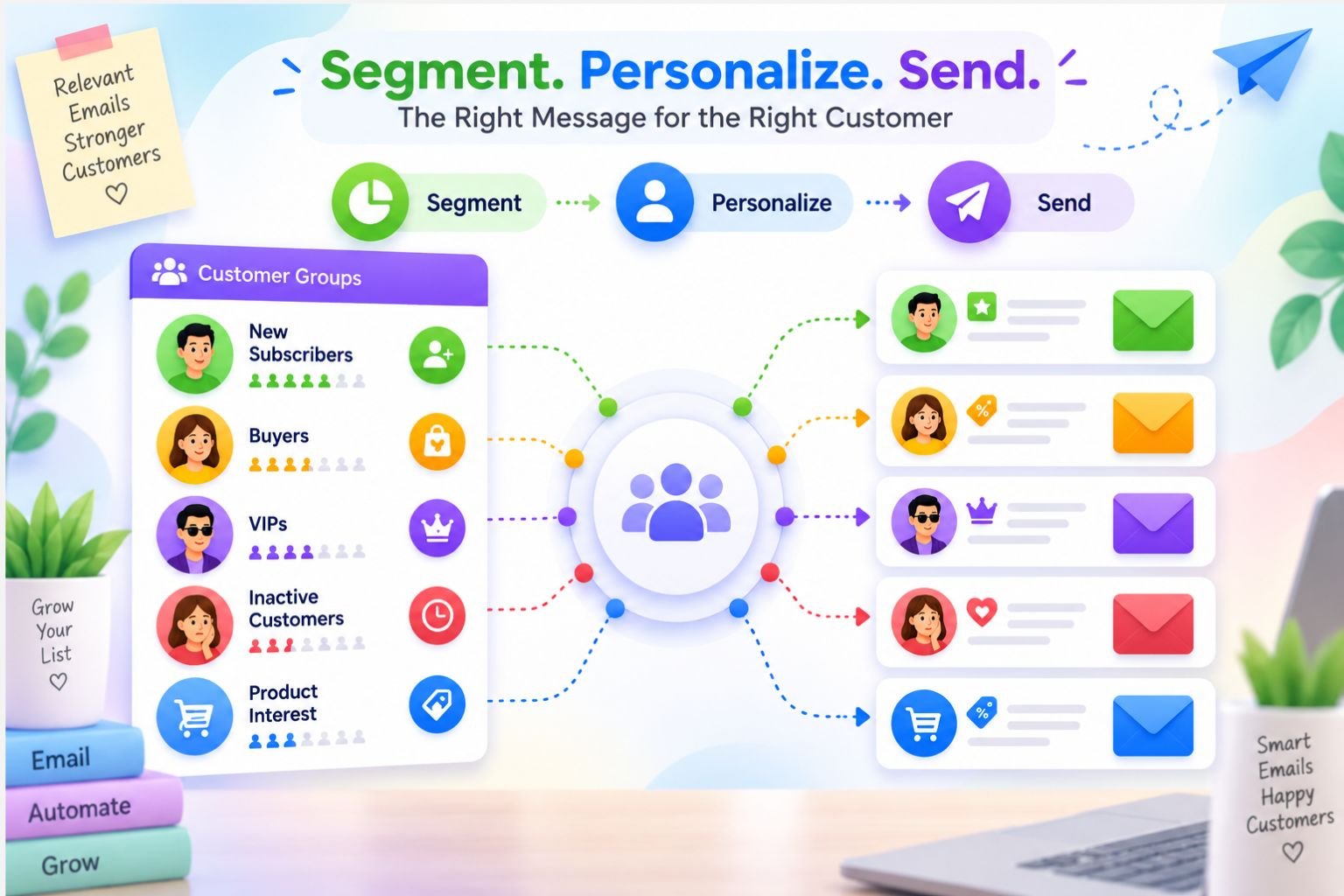
Customer segmentation means grouping customers based on behavior, interest, purchase history, or engagement.
In simple words, you divide your audience into smaller groups so your emails can match them better.
For example, one group may include new subscribers who have not bought yet. Another group may include first-time buyers. Another group may include repeat customers. Another group may include people who added products to cart but did not complete the order.
These groups help your email workflows become more targeted.
Instead of sending one general message to everyone, your store can send emails that feel more connected to the customer’s situation.
That is what makes segmentation useful.
11.2 Why Segmentation Helps Drive Sales
Segmentation helps drive sales because relevant emails usually perform better than general emails.
A customer is more likely to click an email when the message matches their interest.
For example, if someone bought an ecommerce SEO ebook, they may be interested in product page SEO, ecommerce keyword research, or ecommerce automation. Sending them related content makes sense.
But sending them a random offer that has nothing to do with their interest may feel disconnected.
The same idea works for physical products too.
If a customer buys skincare, they may want product usage tips or a related moisturizer. If someone buys a shirt, they may want styling ideas or matching trousers.
Relevant emails feel helpful.
And helpful emails are more likely to lead to clicks, trust, and repeat purchases.
11.3 Basic Segments Beginners Can Use
Beginners do not need complicated segmentation from the first day.
Start with a few simple customer groups that clearly match the buying journey.
Useful beginner segments include:
- new subscribers who have not purchased yet
- first-time buyers
- repeat buyers
- VIP customers
- inactive customers
- product-interest groups
- cart abandoners
These segments are enough for most beginner ecommerce stores.
For example, new subscribers may receive a welcome workflow. Cart abandoners may receive a cart recovery workflow. First-time buyers may receive post-purchase emails. Inactive customers may receive win-back emails.
This keeps your automation simple but still more personal than sending the same email to everyone.
11.4 How Segmentation Works With Workflows
Segmentation makes email workflows stronger because different customer groups need different messages.
A welcome workflow for a new subscriber should not sound like a win-back email for an inactive customer.
A repeat buyer may not need the same introduction as someone who just joined your list. A VIP customer may deserve early access, special rewards, or a more personal message.
Segmentation helps your workflows understand who the customer is.
For example, if someone buys from your store for the first time, they can enter a first-time buyer workflow. If they buy again, they can move into a repeat buyer segment. If they stop engaging for several months, they can enter a win-back workflow.
This creates a smarter customer journey.
The customer receives messages that match their behavior instead of random emails that feel unrelated.
11.5 Example
Let’s imagine a digital product store.
A customer buys an ecommerce SEO ebook. After the purchase, the system tags them as interested in ecommerce SEO.
This tag helps the store understand what the customer cares about.
Later, the store can send related content, such as a blog post about product page SEO, a checklist for ecommerce keyword research, or a recommendation for an ecommerce automation ebook.
This works because the message connects to the customer’s previous action.
The customer does not feel like they are receiving a random promotion. They feel like the store is guiding them toward the next useful step.
That is the real value of segmentation.
It helps your emails feel more thoughtful.
11.6 Mistake to Avoid
The biggest mistake beginners make is creating too many segments too early.
Segmentation is helpful, but it can become confusing if you overcomplicate it.
If you create twenty customer groups before understanding your audience, your email automation can become difficult to manage. You may not know which segment should receive which email.
Start simple.
Create basic segments first. New subscribers, buyers, cart abandoners, and inactive customers are enough in the beginning.
As your store grows, you can add more specific segments based on product interest, order value, purchase frequency, or engagement.
The goal is not to make segmentation complicated.
The goal is to make your emails more relevant.
When you use customer segmentation wisely, your ecommerce email automation workflows become more personal, more helpful, and more likely to drive sales.
Section 12: Digital Growth Flow Email Automation Workflow Framework
By now, you have seen the main ecommerce email automation workflows that can help an online store drive sales.
But beginners often ask one important question:
“Which workflow should I build first?”
That is where a framework helps.
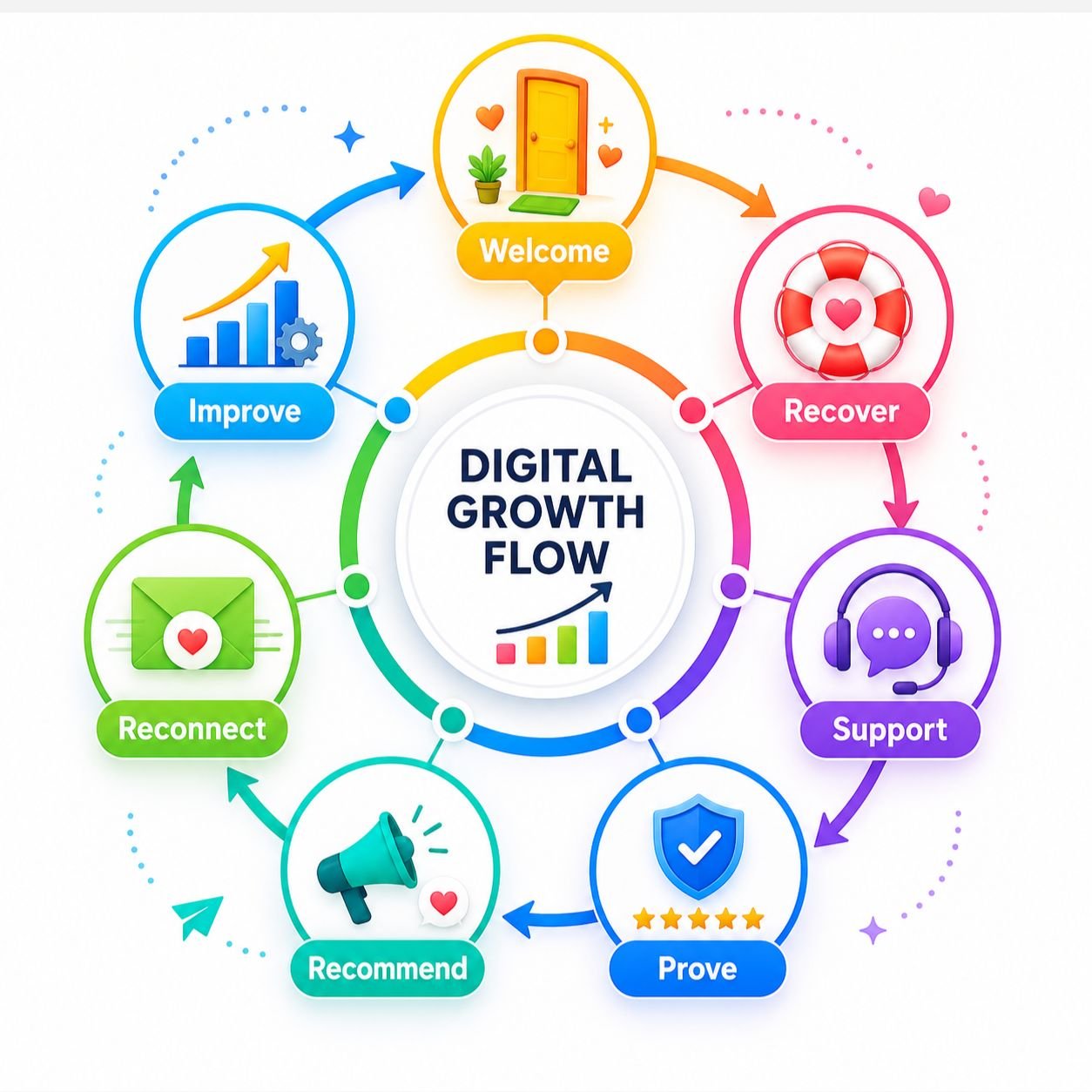
The Digital Growth Flow Email Automation Workflow Framework gives you a simple order to follow. Instead of building random emails, you create a connected system that supports the customer from first signup to repeat purchase.
The framework is simple:
Welcome → Recover → Support → Prove → Recommend → Reconnect → Improve
Each step has a clear purpose.
Step 1: Welcome
Start with a workflow that welcomes new subscribers and introduces the brand.
This is usually the easiest place for beginners to begin because the customer has just joined your email list. They are already paying attention.
Your welcome workflow should thank them, deliver any promised offer, explain what your store is about, and guide them toward the first purchase.
For example, a beauty store can welcome a new subscriber, share a 10% discount code, introduce beginner-friendly skincare categories, and link to best sellers.
The goal is not only to say hello.
The goal is to make the first step feel easy.
Step 2: Recover
The second step is to recover missed sales.
This includes abandoned cart workflows and browse abandonment workflows.
Not every customer buys immediately. Some people view products and leave. Some add items to cart but do not complete checkout. These are not always lost customers. They may only need a reminder, reassurance, or a clearer reason to return.
An abandoned cart workflow helps bring back shoppers who were close to buying. A browse abandonment workflow helps reconnect with visitors who showed lighter interest.
This step matters because it protects sales opportunities that would otherwise disappear.
Step 3: Support
The third step is to support customers after they buy.
This is where post-purchase emails become important.
A customer should not feel ignored after placing an order. They should receive helpful communication that explains what happens next, how to use the product, and where to get support if needed.
For example, a clothing store can send order reassurance first, then care instructions after delivery. A digital product store can send access details and a getting-started guide.
Support builds trust.
And trust makes repeat purchases easier later.
Step 4: Prove
The fourth step is to prove your product value through real customer feedback.
This is where review request workflows help.
After customers receive and use the product, your store can politely ask them to leave a review. Those reviews become social proof for future buyers.
A new customer may feel unsure before buying. But when they see real reviews from other customers, they feel more confident.
For beginners, this is especially important.
A small store may not have a famous brand name yet, but honest reviews can make the store feel more trustworthy.
Step 5: Recommend
The fifth step is to recommend the next useful product.
This is where product recommendation and upsell workflows help.
Once a customer has bought or shown interest, your store can suggest something relevant. The recommendation should connect to what they viewed, bought, or cared about.
For example, if someone buys an ecommerce SEO ebook, you can later recommend an ecommerce automation ebook or a product page checklist.
The goal is not to push random products.
The goal is to help the customer continue their journey with something that makes sense.
Step 6: Reconnect
The sixth step is to reconnect with inactive customers.
This is where win-back workflows help.
Some customers buy once and disappear. Some subscribers stop opening emails. Some people still like your brand, but they forget to return.
A win-back workflow gives them a friendly reason to come back.
For example, a fashion store can email a customer who bought three months ago and show new arrivals that match their previous style.
The message should feel calm and helpful.
Do not make customers feel guilty for being inactive. Invite them back with something relevant.
Step 7: Improve
The final step is to improve your workflows over time.
Email automation is not something you create once and ignore forever. You should review your results and make small improvements based on customer behavior.
Start with the basics:
- subject lines
- email timing
- message clarity
- offers
- CTA placement
- open rate and click rate
- sales and unsubscribes
If people are not opening your emails, improve the subject line. If they open but do not click, improve the message or CTA. If they click but do not buy, check your product page, checkout, pricing, or trust signals.
This step keeps your automation system healthy.
The Digital Growth Flow framework is not about building everything in one day.
It is about building in the right order.
Welcome new people. Recover missed sales. Support buyers. Collect proof. Recommend relevant products. Reconnect with inactive customers. Improve everything slowly.
That is how ecommerce email automation workflows become a real sales system, not just a collection of emails.
Section 13: Ecommerce Email Automation Workflow Checklist
Before you build too many ecommerce email automation workflows, it is important to check the basics.
A workflow should not only exist.
It should have a clear goal, the right trigger, helpful timing, a focused message, and one clear action for the customer.
This checklist will help beginners review the most important parts before launching or improving their email automation system.
Use it as a simple guide, not a complicated rulebook.

13.1 Strategy Checklist
Your strategy comes first.
Before writing emails or choosing tools, you need to understand what each workflow should do. Otherwise, your automation can become messy very quickly.
☐ Main email automation goal is clear
☐ Customer journey stages are identified
☐ First workflow priority is selected
☐ Email timing is planned
☐ Each workflow has one clear purpose
☐ Each email has one main CTA
This step helps you avoid building random workflows.
For example, if your store is new, your first priority may be a welcome workflow. If you already get many abandoned carts, your first priority may be cart recovery.
The right starting point depends on your store’s current problem.
13.2 Welcome Workflow Checklist
Your welcome workflow is often the first email experience a subscriber has with your brand.
So it should feel clear, warm, and useful.
☐ Signup trigger is active
☐ Welcome email is created
☐ Promised offer is delivered
☐ Brand introduction is included
☐ Best products or categories are linked
☐ CTA is clear
If someone signs up for a discount, the discount should arrive quickly. If they joined because they are interested in your brand, your welcome email should help them understand where to start.
Do not only say “welcome.”
Use the email to introduce your store, guide the subscriber, and make the first purchase easier.
13.3 Sales Recovery Checklist
Sales recovery workflows help bring customers back when they leave before buying.
This includes abandoned cart workflows and browse abandonment workflows.
☐ Abandoned cart workflow is active
☐ Browse abandonment workflow is considered
☐ Product image appears correctly
☐ Cart or product link works
☐ Trust signal is included
☐ Flow stops after purchase
This checklist is important because recovery emails need to be accurate.
If the product image is missing, the link is broken, or the email continues after purchase, the workflow can damage trust instead of recovering sales.
A good sales recovery workflow should remind, reassure, and guide the customer back smoothly.
13.4 Post-Purchase Checklist
Post-purchase emails help customers after they buy.
This part of the journey is important because the sale is not the end of the relationship. It is the beginning of the next experience.
☐ Thank-you email is created
☐ Order reassurance is clear
☐ Product usage tips are included
☐ Support contact is visible
☐ Related product suggestion is relevant
☐ Review request timing is planned
A good post-purchase workflow should make the customer feel supported.
Thank them first. Explain what happens next. Help them use the product better. Then, when the timing feels right, you can suggest a related product or ask for a review.
Do not rush into selling again too quickly.
Support should come before another sales pitch.
13.5 Optimization Checklist
After your workflows are active, you need to improve them over time.
Email automation is not something you set once and ignore forever. Customer behavior can show you what needs to change.
☐ Subject lines are clear
☐ Emails are mobile-friendly
☐ Links are tested
☐ Discount codes work
☐ Open rate is reviewed
☐ Click rate is reviewed
☐ Sales and repeat purchases are tracked
☐ Unsubscribe rate is monitored
This part helps you understand performance.
If people are not opening your emails, your subject line may need improvement. If they open but do not click, your message or CTA may not be clear enough. If people unsubscribe too often, your emails may feel too frequent or irrelevant.
Small improvements can make a big difference.
You do not need to perfect every ecommerce email automation workflow from the beginning. Start with the most important workflow, check the basics, test everything, and improve step by step.
That is how beginners build email automation with more confidence and fewer mistakes.
Conclusion: Build Sales With Helpful Email Workflows
Ecommerce email automation workflows help your store communicate at the right time.
They are not only about selling harder or sending more emails. They are about guiding customers through the journey with helpful, relevant messages.
A welcome workflow helps new subscribers understand your brand. A recovery workflow brings back missed sales. A post-purchase workflow supports customers after they buy. Review requests build trust. Product recommendations encourage repeat purchases. Win-back emails reconnect with inactive customers.
Together, these workflows create a more connected ecommerce experience.
But beginners should not try to build everything at once.
Start with one important workflow. Test it. Improve the subject line, timing, message, CTA, and offer. Then move to the next workflow when you are ready.
Sales grow better when the customer journey feels clear, helpful, and connected.
Build Your Ecommerce Automation System With Digital Growth Flow
You now understand the essential ecommerce email automation workflows that can help your store drive sales, recover missed opportunities, and increase repeat purchases.
The next step is learning how these workflows fit into a complete ecommerce automation system.
For a beginner-friendly roadmap, explore the Digital Growth Flow Ecommerce Automation Ebook and learn how to build simple automation workflows that save time, improve customer experience, and support long-term ecommerce growth.