
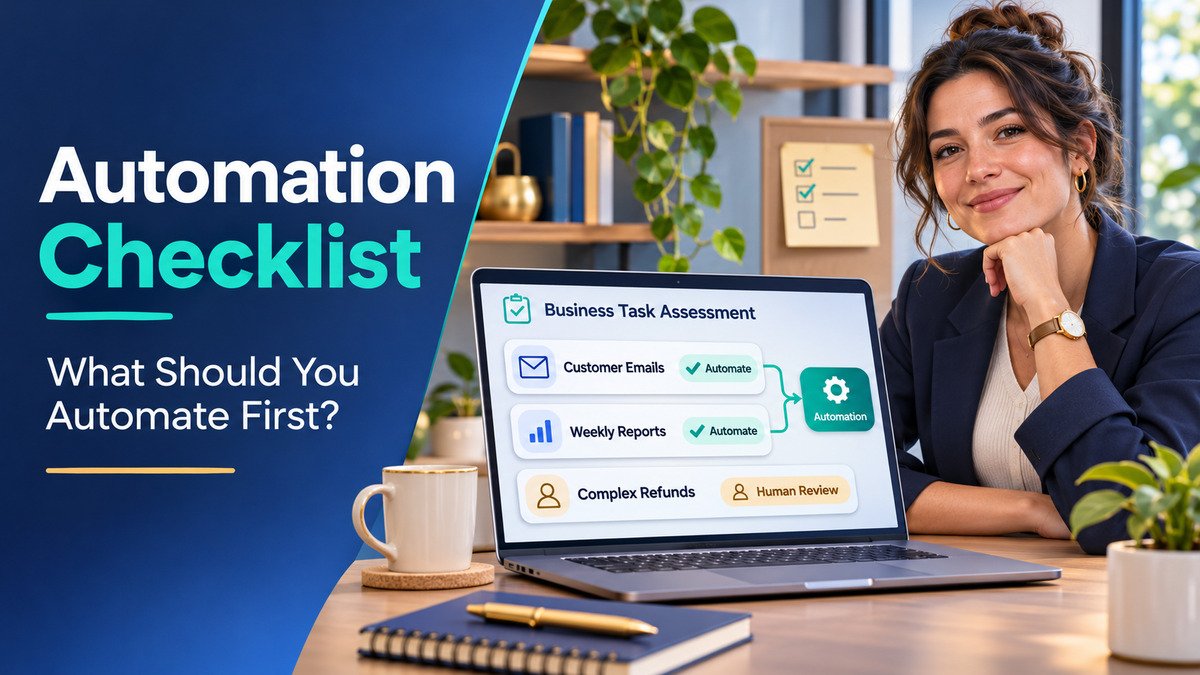
What if automating the wrong business task actually creates more work?
Imagine running a small online store. You spend mornings answering customer inquiries, checking inventory, and updating spreadsheets.
Automating everything might sound appealing—until an incorrect stock alert or an automated response to a sensitive complaint creates problems you now have to fix.
That’s why the real question isn’t simply, “What can I automate?” It’s “What should I automate first?”
A practical automation checklist helps you identify repetitive tasks, assess whether they’re suitable for automation, and recognize when human judgment is still necessary.
In this guide, you’ll explore 20 everyday business tasks, evaluate them using the DGF Automation Readiness Checklist, and discover how to prioritize your options with a simple Automation Priority Scorecard.
The goal?
To help you choose one worthwhile task to automate—without creating unnecessary complexity.
What Is Traditional SEO, and How Does It Work?
An automation checklist is a structured list of tasks and questions that helps you identify repetitive work, evaluate whether it can be automated reliably, and decide what to automate first.
Think of it as a decision-making guide—not a shopping list for software.
A practical business automation checklist helps you answer three important questions:
- Task Discovery: Which everyday activities are repetitive enough to consider automating?
- Automation Readiness: Are the steps clear, the information reliable, and the necessary safeguards in place?
- Prioritization: Which suitable task should you focus on first?
Here’s a simple example.
Imagine a small online retailer preparing inventory reports every Friday. If the records are accurate and the process follows consistent steps, automating the report might be worthwhile.
But automatically approving unusual customer refunds?
That could require human judgment, especially when circumstances are complicated.
The good news is that you don’t need programming skills or expensive automation software to evaluate your tasks.
Start by understanding how your business works. The tools can come later.
What Makes a Business Task Suitable for Automation?
Just because a task is repetitive doesn’t mean you should automate it. The best candidates have clear steps, reliable information, and benefits worth the effort.
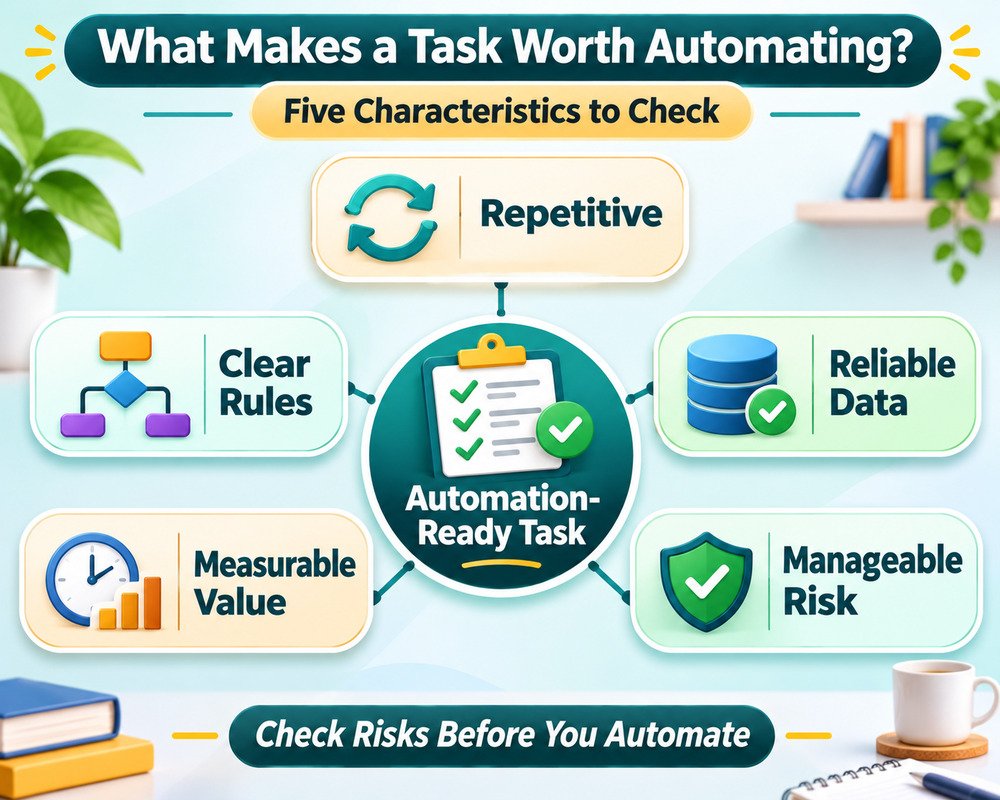
Before adding any task to your automation checklist, look for these five characteristics.
Repetitive and Frequent Tasks
Start with activities you perform regularly, such as preparing weekly inventory reports or sending order confirmations. A task performed only occasionally might take more effort to automate than it saves.
Tasks With Clear Rules and Predictable Steps
Can you explain exactly what starts the task and what should happen next?
For example, a verified customer order might trigger a standard confirmation email. But if every situation requires a different decision, automation becomes harder to manage.
Tasks Using Reliable and Accessible Information
Automation depends on accurate inputs. Missing customer details, duplicate orders, or incorrect stock records can lead to unreliable results.
Check the quality of your information before automating the task.
Tasks With Measurable Benefits
Think beyond saving time. Consider how frequently mistakes, delays, or manual corrections occur.
Microsoft’s Power Automate guidance explains how analyzing business processes can reveal inefficiencies and automation opportunities.
For a simpler starting point, track how long one task takes and how often problems occur.
Tasks With Manageable Exceptions and Risks
What happens when information is missing, or something goes wrong?
Consider customer privacy, necessary approvals, human review, and whether someone can complete the task manually if automation fails.
As Zapier’s automation guidance discusses, repetitive, rule-based activities are often sensible automation candidates.
But remember:
A repetitive task isn’t necessarily suitable for unattended automation. Human judgment and appropriate safeguards still matter.
The DGF Automation Checklist: 20 Business Tasks to Review
Which parts of your workday keep repeating? Before you choose an automation tool, take a few minutes to notice the tasks you still handle manually.
This automation checklist covers 20 possible opportunities across five business functions. Tick a box only if you currently do that task manually. A checkmark does not mean the task is safe, worthwhile, or ready to automate. You’ll assess that later.
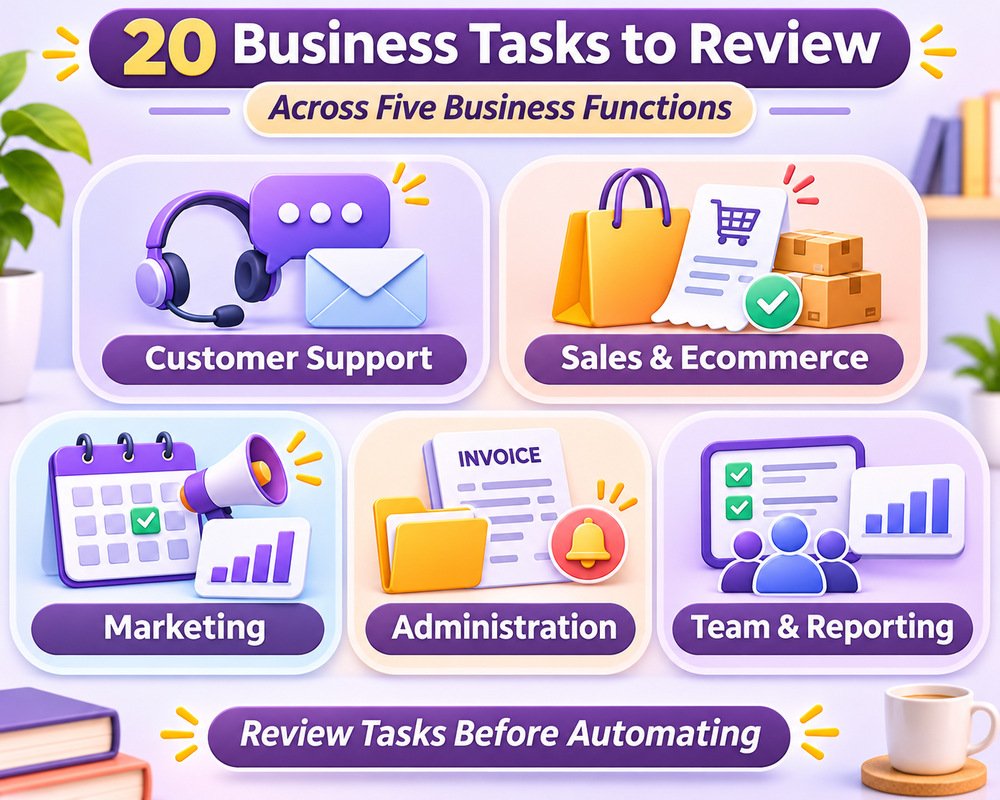
Customer Communication and Support
- Send acknowledgments for new customer inquiries.
- Route inquiries to the appropriate person or department.
- Send approved appointment or booking reminders.
- Categorize routine support requests for review.
Imagine a small online shop receiving similar questions about opening hours or delivery every day. An acknowledgment or properly routed inquiry might help the team respond consistently.
But acknowledging a message isn’t the same as resolving it. Sensitive complaints, unusual requests, and conversations involving personal information may need a trained person. Check that messages reach the right recipient and customers have a way to contact a human when needed.
Sales and Ecommerce
- Send order confirmations after verified purchases.
- Create alerts when inventory falls below an agreed level.
- Send eligible abandoned-cart reminders under applicable communication rules.
- Notify customers about verified shipping or order-status updates.
An online clothing retailer might benefit from low-stock alerts before popular shirt sizes run out. Yet an incorrect inventory record could trigger an unnecessary alert, while an unverified shipping update could mislead a customer.
Use confirmed order and fulfillment data, not assumptions. For promotional reminders, check marketing permissions, platform policies, and applicable local rules. Shopify’s marketing guidance also emphasizes permission-based customer communications.
Marketing and Content Management
- Schedule previously reviewed social media posts.
- Send approved welcome messages to new subscribers.
- Deliver requested lead magnets or downloadable resources.
- Collect routine campaign performance data into reports.
Suppose a freelancer publishes educational posts every week. Scheduling approved content could reduce repetitive publishing work; automatically delivering a resource someone requested may also be convenient.
However, automation should handle routine delivery, not replace editorial judgment. Someone still needs to check facts, links, branding, and timing. Subscriber messages should respect relevant permission and opt-out requirements, and reports depend on reliable source data.
Administration and Finance
- Prepare invoices from approved transaction records.
- Send appropriate payment-due reminders.
- Organize incoming receipts or expense records for review.
- Alert the owner to recurring bills or subscription renewals.
For a small service business, generating invoice drafts from already approved project records may reduce repeated data entry. Reminders can also make upcoming bills easier to notice.
But financial records deserve extra care. Preparing an invoice is different from authorizing a payment, and categorizing a receipt is not the same as verifying the accounts. Keep human checks for incorrect amounts, disputed transactions, reconciliation, and sensitive financial decisions.
Team Operations and Reporting
- Assign routine tasks using approved rules.
- Send reminders for recurring deadlines.
- Run authorized backups of important business files.
- Compile weekly performance reports from verified sources.
A small team might spend every Friday gathering the same sales figures into a report. That could be a useful candidate if the underlying records are trustworthy.
Still, someone must own the process. Check access permissions, investigate missing data, and review failed runs; backups also need occasional restoration tests. Microsoft’s monitoring guidance explains the importance of watching for automation errors.
What should you do with your completed checklist?
For each checked task, note its frequency, time required, and recurring mistakes. These observations will make the next assessment more useful, especially when two tasks appear equally promising but involve different amounts of effort, oversight, or risk.
Look at the tasks you’ve ticked, then choose up to three that repeat often and follow understandable steps. Carry those candidates into the DGF Automation Readiness Checklist in the next section.
Remember:
This is a task-discovery list—not a recommendation to automate all 20 activities. The right first task is one you can evaluate, control, and improve safely.
The DGF Automation Readiness Checklist
You’ve identified a few repetitive business tasks. But here’s an important question: Are they actually ready to be automated?
A task might seem straightforward until missing information, unexpected situations, or approval requirements complicate the process.
That’s where the DGF Automation Readiness Checklist comes in. It helps you examine a task before investing time or money in automating it.
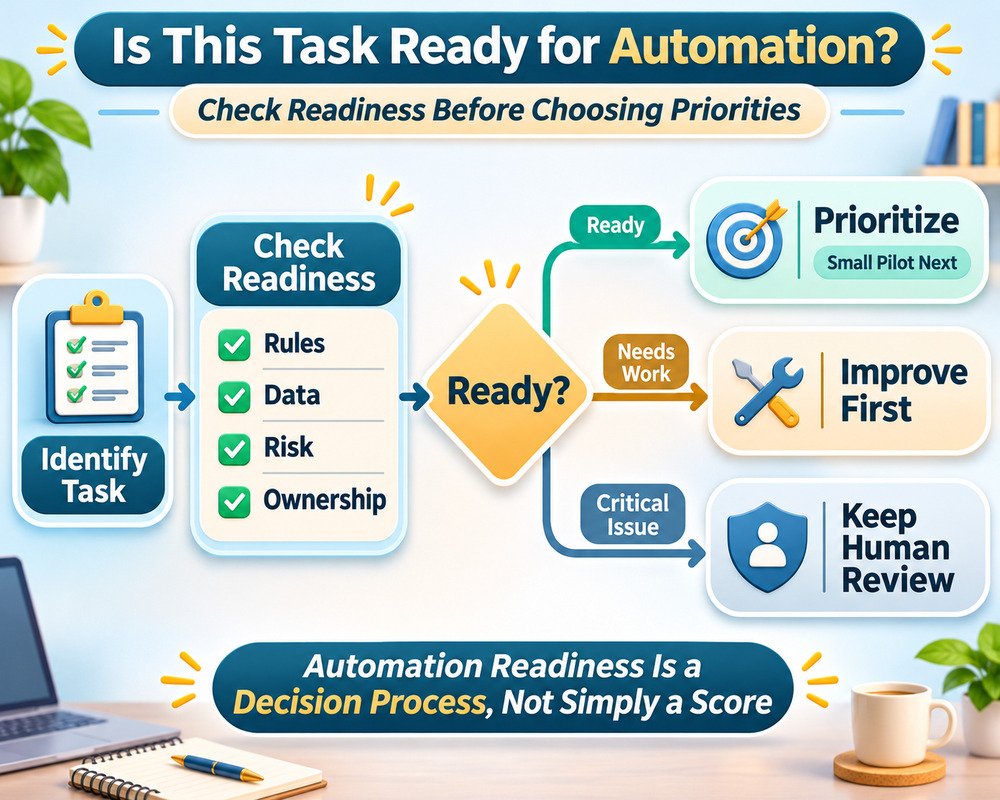
Ten Questions to Ask Before Automating a Task
Choose one task from your earlier checklist. Read each question and tick Yes, No, or Needs Investigation. If you’re unsure, don’t guess—mark it for further review.
Readiness Question | Yes | No | Needs Investigation |
1. Does this task happen regularly enough to justify automation? | ☐ | ☐ | ☐ |
2. Can I describe its normal steps clearly? | ☐ | ☐ | ☐ |
3. Is the event that starts the task identifiable? | ☐ | ☐ | ☐ |
4. Is the expected result clearly defined? | ☐ | ☐ | ☐ |
5. Are the necessary data accurate and accessible? | ☐ | ☐ | ☐ |
6. Can common exceptions be identified and handled? | ☐ | ☐ | ☐ |
7. Are permissions, privacy, and other relevant requirements understood? | ☐ | ☐ | ☐ |
8. Is there a person responsible for reviewing the results? | ☐ | ☐ | ☐ |
9. Can the task be paused or completed manually if automation fails? | ☐ | ☐ | ☐ |
10. Can I measure whether the automation is actually helping? | ☐ | ☐ | ☐ |
What Your Answers Mean
Mostly Yes: The task may be suitable for a small, controlled test, provided no critical issues remain unresolved.
Several Needs Investigation: Examine the unclear steps, improve your information, or document the process before proceeding.
Critical No: Resolve problems involving privacy, permissions, data reliability, human oversight, or recovery from failures before automating.
Consider a small online retailer. Low-stock alerts might seem like an obvious automation opportunity. But if inventory records are frequently inaccurate, the owner should improve those records first.
Remember, this checklist isn’t a guaranteed readiness score. It’s a practical decision-making exercise.
Once a task passes the important readiness checks, you can use the DGF Priority Scorecard to decide whether it deserves attention first.
How to Prioritize Tasks for Automation: The DGF Priority Scorecard
Several tasks passed your readiness checklist. Which should you automate first? Compare their benefits and practical demands.
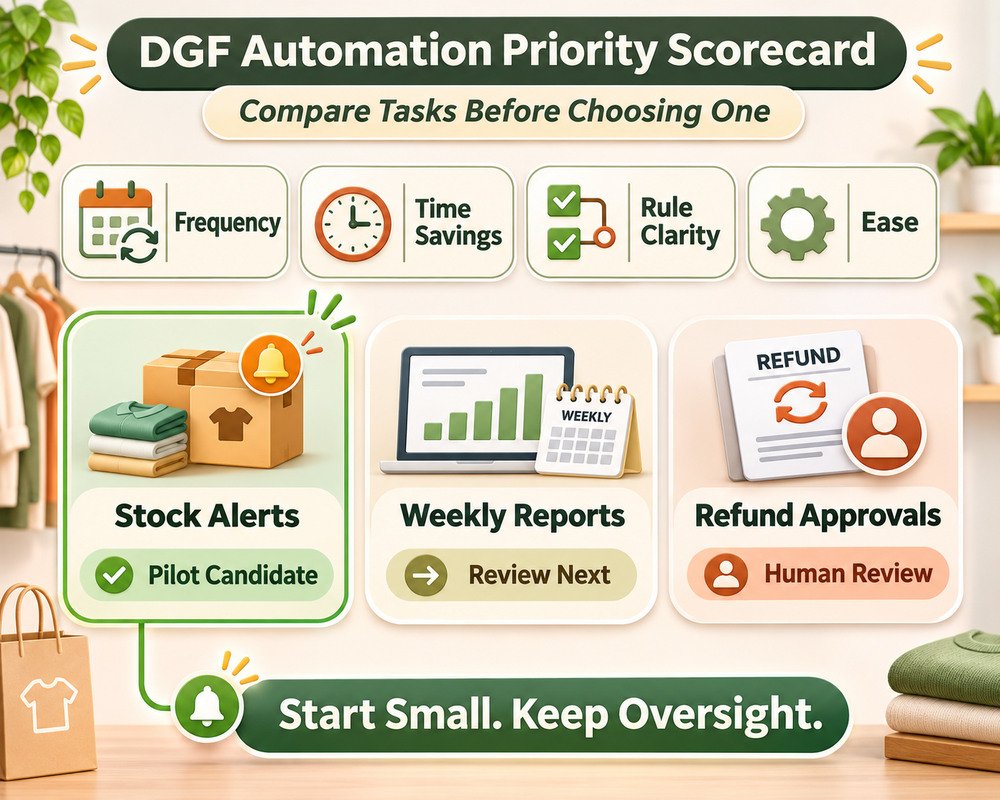
The DGF Automation Priority Scorecard rates eligible tasks across four factors. Give each 1 (low), 2 (moderate), or 3 (high).
Four Factors to Compare
1. Frequency: 1 = occasional; 2 = weekly; 3 = most working days.
2. Potential Time Savings: 1 = little; 2 = moderate; 3 = substantial time saved, based on estimated manual effort.
3. Rule Clarity: 1 = frequent judgment; 2 = mostly consistent with exceptions; 3 = predictable steps.
4. Ease of Implementation: 1 = difficult setup and maintenance; 2 = manageable; 3 = straightforward.
Add the ratings for a total out of 12. Higher scores suggest stronger candidates only after readiness checks.
A Simple Automation Priority Table
Task | Frequency | Time Savings | Rule Clarity | Ease | Total |
Low-stock inventory alerts | 3 | 2 | 3 | 3 | 11/12 |
Weekly sales-report preparation | 2 | 3 | 3 | 2 | 10/12 |
Unusual refund approval* | 2 | 3 | 1 | 2 | 8/12 |
Calculations: stock alerts, 3 + 2 + 3 + 3 = 11; weekly reports, 2 + 3 + 3 + 2 = 10; refunds, 2 + 3 + 1 + 2 = 8.
Refund approvals are included for illustration only. If sensitive judgment or authorization is unresolved, they fail the readiness check and must be excluded, regardless of score.
Why the Highest Score Isn’t Always the Final Decision
If inventory records are inaccurate, an 11/12 score cannot make stock alerts reliable. Correct the records first.
Likewise, privacy, financial authorization, possible customer harm, and legal obligations cannot be averaged away. They require separate checks, human oversight, and a recovery plan.
Key takeaway:
Score only tasks that have passed readiness checks, then test one manageable candidate. This is an original DGF educational exercise, not a validated industry assessment.
A Practical Example: Choosing the First Task to Automate
Understanding an automation checklist is one thing. But how do you actually use it to make a business decision?
Let’s walk through a realistic, fictional example to see how task discovery, readiness assessment, and prioritization work together.
Meet a Small Online Clothing Retailer
Imagine a small business owner selling shirts through an ecommerce website. As orders arrive, the owner handles several routine activities alongside managing customers and products.
Every week, they check inventory levels, prepare sales reports, and review customer refund requests.
These activities take time, but that doesn’t mean all three should be automated. Some follow predictable rules, while others require careful judgment.
The owner decides to use the DGF automation checklist to identify a suitable starting point.
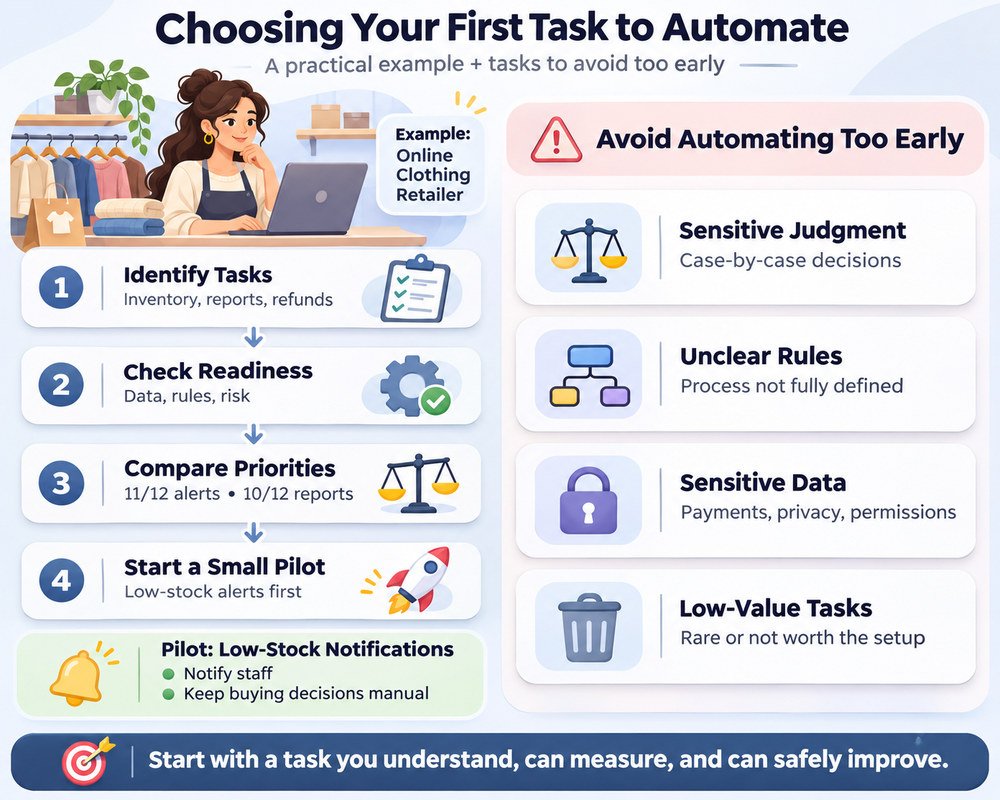
Step 1—Identify the Candidate Tasks
The owner begins by reviewing everyday responsibilities rather than immediately searching for automation software.
Three activities stand out:
- Inventory monitoring: Checking available shirt sizes and identifying products that may need restocking.
- Weekly sales reporting: Collecting order information and preparing a summary of sales activity.
- Refund approvals: Reviewing customer requests and deciding whether refunds should be authorized.
All three involve repeated work, making them reasonable candidates for an initial assessment.
However, identifying a task is not the same as approving it for automation.
At this stage, the owner simply records how often each activity occurs, how much manual attention it requires, and which problems regularly appear.
This information helps make the next decision more informed.
Step 2—Apply the Readiness Checklist
Next, the owner examines each activity using the ten-question DGF Automation Readiness Checklist.
Consider inventory monitoring first.
Suppose the store maintains accurate stock records, updates quantities after verified sales, and has clear minimum-stock thresholds.
In that situation, generating a notification when a particular shirt size falls below its threshold could be a suitable automation candidate.
Weekly sales reporting might also qualify. If completed orders are recorded consistently, the system could prepare a report for the owner to review.
But unusual refund approvals are different.
A customer might dispute a delivery, report a damaged product, or request an exception to the usual return policy. These situations can involve financial authorization and individual circumstances.
The owner therefore keeps final approval of unusual refunds under human control.
The important distinction is that the first two tasks may pass the readiness assessment, while the third is excluded from unattended approval unless appropriate safeguards and authorization arrangements are established.
Step 3—Compare Priorities
Now the owner has two eligible tasks. Which one deserves attention first?
This is where the DGF Automation Priority Scorecard becomes useful.
The owner compares task frequency, potential time savings, rule clarity, and ease of implementation.
Using the hypothetical ratings established earlier:
Task | Priority Score | Decision |
Low-stock inventory alerts | 11/12 | First pilot candidate |
Weekly sales-report preparation | 10/12 | Consider next |
Unusual refund approval | 8/12 (illustrative only) | Excluded pending critical readiness requirements |
Low-stock alerts receive the higher score because, under our assumptions, the task occurs frequently, follows clear rules, and appears relatively straightforward to implement.
Weekly reporting also looks promising, but preparing and validating reports may involve additional steps.
The earlier refund score remains an illustrative comparison, not permission to automate sensitive approvals.
Remember, these scores represent fictional assumptions—not measured results or guarantees.
Step 4—Select One Small Pilot
Based on the assessment, the owner chooses low-stock inventory notifications as the first task to test.
Instead of automating an entire inventory-management process, they begin with a limited goal:
Notify a designated staff member when a verified product’s available stock falls below an agreed threshold.
For example, the owner could test alerts for a few shirt sizes whose inventory records have already been checked.
During the pilot, the owner reviews whether notifications appear at the correct time, whether stock quantities match actual records, and whether unnecessary or duplicate alerts occur.
If the information is incorrect or notifications fail, the owner can stop the automation and return to manual checks while investigating the problem.
Importantly, the system doesn’t automatically purchase additional inventory. Restocking decisions remain with the owner, who can consider supplier availability, customer demand, and the business’s budget.
Once the pilot has been reviewed, the owner can decide whether to improve it, expand it, or leave the task manual.
The lesson:
You don’t need to automate your entire business at once. Identify repetitive work, check readiness, compare suitable candidates, and begin with one controlled task whose results you can evaluate.
Which Business Tasks Should You Avoid Automating Too Early?
Automation can simplify repetitive work, but some tasks are better handled by people. The goal isn’t to automate everything; it’s to improve how your business operates.
Tasks Requiring Sensitive Human Judgment
Consider unusual refunds, important hiring decisions, or complaints involving personal circumstances. These situations require context, empathy, and discretion that fixed rules may not provide. Automation could organize information or flag requests while a person makes the final decision.
Tasks With Unclear or Frequently Changing Rules
If employees handle the same situation differently each week, automation could reproduce the confusion faster. Document the steps, resolve inconsistencies, and establish how to handle exceptions before proceeding.
Tasks Involving Sensitive Data or High-Impact Actions
Approving payments, changing account permissions, or processing confidential customer information can have serious consequences if something goes wrong. Check access controls, privacy requirements, approval responsibilities, and how errors would be corrected. Don’t remove human approval just to save a few clicks.
Tasks That Rarely Occur or Offer Little Practical Benefit
A task performed twice a year may take less time to complete manually than to automate, test, and maintain. Compare the likely benefit with the setup and ongoing effort.
Sometimes the smarter move is to simplify a task, document it properly, or eliminate unnecessary steps. Automation should support a sound process—not substitute for one.
How to Test Your First Automation Safely
A promising automation idea still needs testing. Before relying on it daily, run a small pilot to check results, including failures.
Start With a Small Pilot
Choose one narrowly defined activity, not an entire department’s workflow. For a clothing retailer, consider testing low-stock alerts for five shirt sizes with verified inventory records, without letting the system place any purchase orders.
Test Normal Cases and Exceptions
Check whether alerts appear when stock crosses the chosen threshold. Then consider missing quantities, duplicate records, outdated information, or a failed connection. Does the automation avoid sending misleading or repeated alerts? Record unexpected results and investigate their causes.
Keep Human Oversight
Ask a designated person to review early alerts against actual stock. Keep approval with the owner for restocking orders. As Microsoft’s guidance on testing flows explains, testing should consider failures and error handling.
Measure the Actual Results
Before the pilot, note how long manual stock checks take and how often corrections are needed. Compare time spent checking alerts, missed notifications, and effort correcting errors. A useful automation should improve the overall process, not simply move the work elsewhere.
Maintain a Manual Fallback
Document who will check stock manually if notifications stop, data becomes unreliable, or the connection fails. Make sure the team knows how to pause automation and recover.
Key Takeaway:
Start small, test exceptions, track real outcomes, and keep people responsible for important decisions.
Common Automation Checklist Mistakes to Avoid
Even a promising automation idea can cause problems if you overlook important details. Before moving forward with your automation checklist, watch out for these five common mistakes.
Automating a Broken Process
If a task already involves confusing instructions, unnecessary steps, or frequent errors, automation may simply repeat those problems faster. Improve the process first, then consider automating it.
Choosing Tools Before Identifying the Problem
It’s tempting to explore popular automation software immediately. But without a clear business need, you might pay for features you rarely use. Identify the problem before choosing a solution.
Ignoring Exceptions and Incorrect Data
Missing customer details, duplicate orders, or outdated records can produce unreliable automated results. Consider unusual situations and decide how errors should be handled.
Treating Estimated Time Savings as Guaranteed
An automation that appears to save hours may still require monitoring, corrections, and maintenance. Compare actual results with your original estimates before deciding whether it’s worthwhile.
Forgetting Ownership and Monitoring
Automated tasks still need someone responsible for checking performance, investigating failures, and making improvements.
Remember:
Successful automation isn’t about doing everything automatically. It’s about making business processes more reliable and manageable.
Frequently Asked Questions
1. What Should Be Included in an Automation Checklist?
An automation checklist should help you decide whether a task is worth automating, not simply list things software could do. Record how often the task happens, its usual steps, the information it needs, and the result you expect.
Then check data accuracy, common exceptions, privacy or approval risks, and who will review outcomes. Finally, estimate possible benefits and decide how you’ll monitor failures or make corrections during a small pilot.
2. What Business Tasks Should I Automate First?
Start with a task that repeats frequently, follows clear rules, and carries manageable risks. For example, a small online store might test low-stock notifications or a routine weekly sales report before attempting anything that approves refunds or moves money.
Compare the expected time saved with setup and ongoing review. A sensible first task is one you can measure, supervise, and complete manually if the automation stops working without disrupting customers.
3. How Do I Know Whether a Task Is Ready for Automation?
Use an automation readiness checklist to check the task’s trigger, required inputs, expected outcome, and step-by-step rules. Ask whether the data is trustworthy and whether you know what to do when information is missing or unusual.
Identify any permissions, customer privacy obligations, or human approvals involved. Make sure someone owns the process and that a manual fallback exists.
If critical questions remain unanswered, improve the process and gather missing information before testing.
4. Can Small Businesses Automate Tasks Without Coding?
Yes.
Many established platforms offer no-code features for tasks such as sending reminders, moving approved information between apps, or preparing routine notifications.
But “no-code” doesn’t mean “no setup”: you still need to define rules, connect appropriate accounts, test exceptions, and monitor results, manage errors, and maintain access permissions.
Available integrations, pricing, usage limits, and permissions vary by provider and plan. Choose software only after your checklist identifies a suitable task.
5. Should Every Repetitive Business Task Be Automated?
No.
Repetition is a useful clue, but it isn’t enough on its own. A task might involve sensitive financial decisions, unreliable records, changing rules, or too little work to justify setup costs.
In those cases, simplify the steps, correct the data, keep human approval, or continue manually. Sometimes eliminating an unnecessary task creates more value than automating it. Use your automation checklist to make that distinction thoughtfully rather than assuming automation is necessary.
Start With One Task, Not an Entire Business
Automation works best when it solves a clear problem—not when it adds another tool to manage.
Revisit the 20-task automation checklist to identify recurring manual work. Use the DGF Automation Readiness Checklist to check rules, data, risks, and oversight. Then compare eligible candidates with the DGF Priority Scorecard and choose one manageable task to test.
If you’re new to the topic, read Business Automation for Beginners: What It Is, How It Works & Where to Start for the fundamentals.
Your goal isn’t to automate your entire business. It’s to make everyday work more reliable and decisions more informed. Start with a task you understand, can measure, and can safely improve.
